1 · Find the conversation and choose its authority
Messages are where reply mode meets the real guest thread.
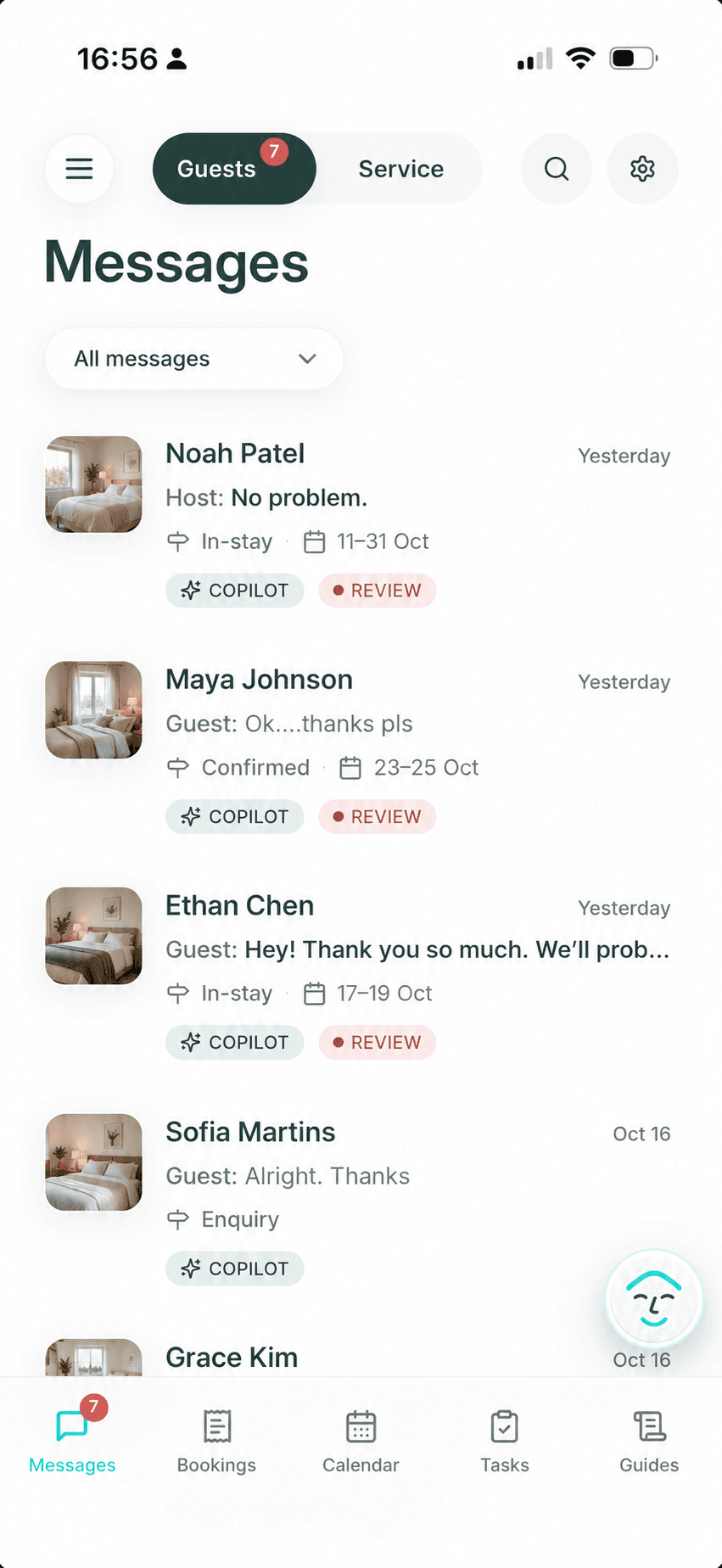
Open Messages → Guest to read the Airbnb conversation, see its booking context, filter by Copilot, Autopilot, or Manual, and find conversations marked Review. In message settings, AI Reply controls the default for new conversations; changing that default does not change an existing conversation.
Turning AI Reply off pauses AI drafts and automatic replies. It does not silently rewrite saved conversation modes. A direct host reply in Airbnb cancels the pending AI reply for that guest message.
2 · Set the default for new conversations
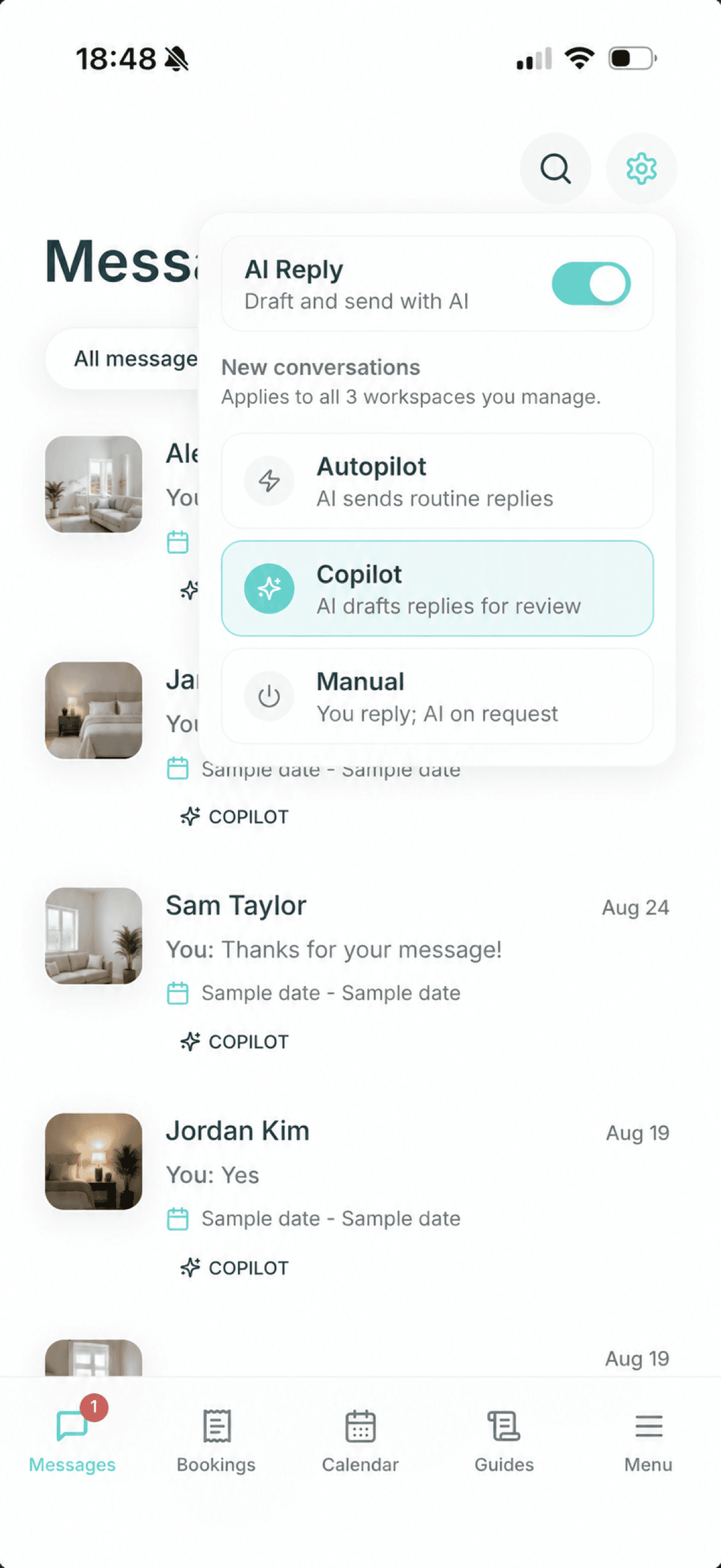
AI Reply chooses the starting mode, not the final outcome.
In message settings, turn AI Reply on or off, then choose Autopilot, Copilot, or Manual for new conversations. Autopilot is for trusted routine replies, Copilot prepares a draft for review, and Manual leaves the reply to the host.
This setting applies to new conversations and does not silently rewrite an existing thread. Check the conversation's current mode when a guest message is already in progress.
3 · Pick the mode that matches the decision
Copilot
Morphic writes a reply draft. It sends only after you approve it.
Start here when you want help with wording while retaining a final send decision.
Autopilot
Morphic can handle trusted routine replies and asks you when judgment is needed.
Use only for routines you have checked; exceptions and real-world uncertainty still need host review.
Manual
You handle the conversation yourself.
Use it when you want to take over a thread or keep future messages in that conversation human-led.
Early check-in, late checkout, refunds, access uncertainty, complaints, safety, damage, cleaning status, and policy exceptions can depend on facts outside the message thread. Treat them as host decisions unless you have an approved, applicable rule.

4 · Review a draft or take over
Review means a host decision is still required.
Send
Approve and send the draft.
Edit
Change the wording, then send.
Reject
Discard the proposed draft.
The App gives the clearest view of the full thread, booking context, controls, and Guide settings. WhatsApp and web remain optional ways to access Morphic when a quick request or notification is more useful.
5 · Timing and Test AI
Check saved settings before assuming why a reply is late.
Autopilot timing affects automatic guest replies, not Copilot drafts. It is set separately for New enquiries, Confirmed bookings, and Arrival to checkout. Each starts with a one-hour New burst wait, a 30-minute Follow-up wait, and Quiet hours from 22:00 to 10:00 in the account timezone. A conversation can override these, so check the saved values in the App.
Test AI lets a host try a question against the relevant listing, booking, and Guide context. It is a simulation: it does not send a message to the guest. Use it after changing an important rule or adding an answer.
AI Guides covers scopes and direct edits; Guide learning covers how corrections become proposals. Escalations and reminders covers the Review badge and reminder schedule.
6 · Keep the request open until its outcome is known
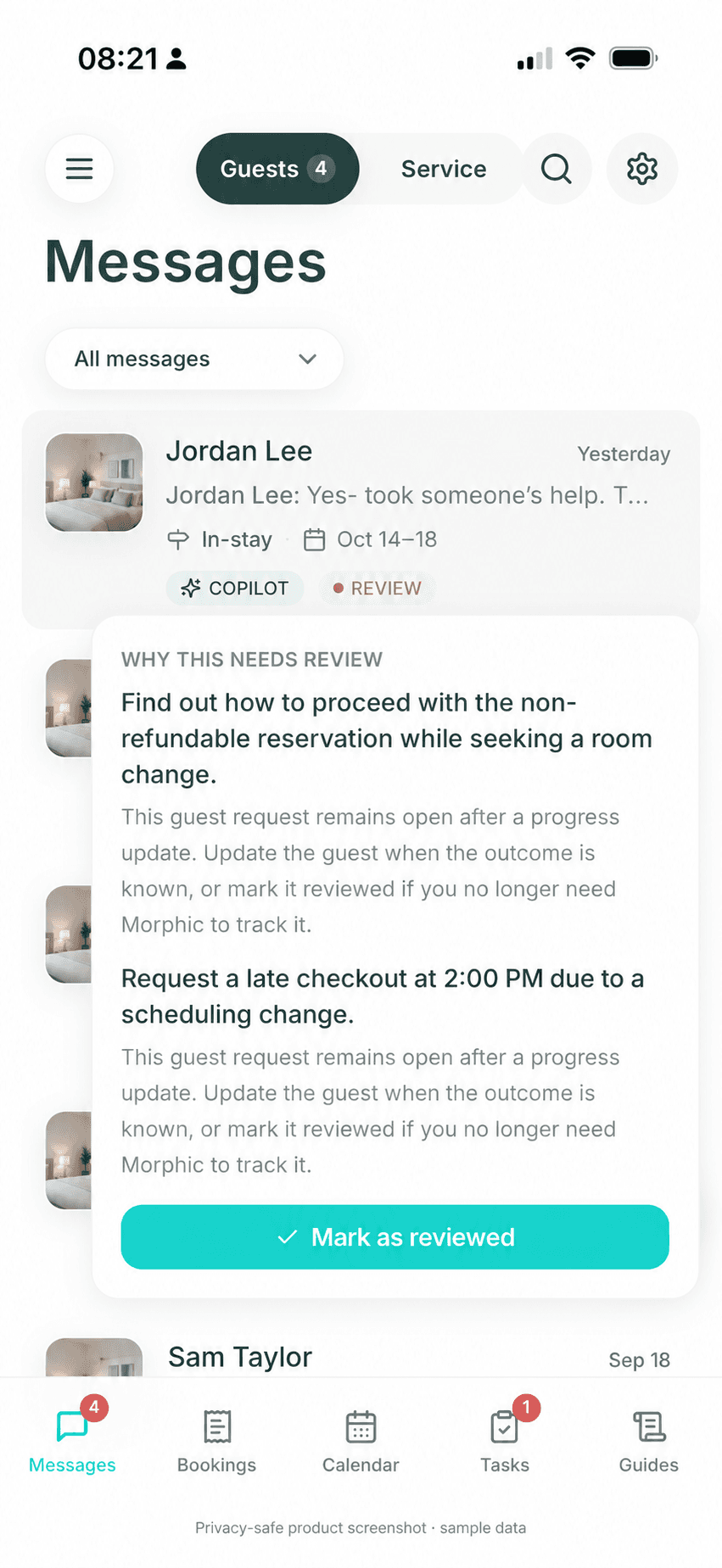
A reply or progress update is not the same as resolving the guest's need.
A useful update can keep a guest informed without requiring another message right now. The original request can still remain open if the outcome depends on a host decision or real-world follow-up. Keep those two facts separate instead of treating an acknowledgment as completion.
Keep the source request
Keep the guest's original question or promised next step visible in its conversation.
Track service separately
If a known provider needs to act, use a host-approved handoff and track their confirmation in the service workflow.
Review only when tracking can stop
Mark the guest item reviewed when Morphic no longer needs to track it. A provider's completion report is not an independent property inspection.
Use known answers without approving every routine reply.
Keep confirmed property details in Airbnb and the relevant Listing Guide. Earlier host replies can become reusable knowledge through Guide learning; this is separate from the current conversation history and does not mean every reply searches every past guest thread.
For automatic routine replies, turn AI Reply on, choose Autopilot as the default for new conversations, and check the mode on any existing conversations you also want automated. Set reply timing and quiet hours, then enable your preferred escalation alerts. Guide learning has its own mode: approving a Guide update does not enable automatic guest sending.
Message-workflow boundary
Keep property facts and real-world promises under host control.
Use Airbnb for standard listing facts and the narrowest relevant Guide for additional host instructions. Morphic does not replace local cleaning, inspection, repair, emergency response, or host judgment. If a guest request depends on a live property condition or an exception, verify it before making a promise.
Image provenance: the mobile captures on this page are approved example, cropped, or de-identified product screens. They illustrate controls and workflow only; customer conversations, names, and property details are not published here.