AI answer1
Answer approved facts
Known and reusable
- Wi-Fi name
- Parking steps
- Appliance instructions
- Known house rules
Reply from host-approved listing and AI Guide context. If a fact is missing, stop instead of guessing.
Airbnb message automation
Automate Airbnb messages with scheduled replies for predictable events and contextual AI for guest questions. Airbnb also offers native AI messaging features in a phased rollout. Morphic adds Copilot review, trusted Autopilot routines, and follow-up on guest needs that remain open after a reply.
Reviewed by Liam, Founder, Morphic
Written for self-managing Airbnb hosts choosing between scheduled templates, AI replies, and host review.
Evidence and scope
Guidance draws on official Airbnb documentation, Morphic production workflows, and research conversations with 50+ hosts and co-hosts. It is not an Airbnb endorsement.
For booking, arrival, and checkout reminders, start with Airbnb scheduled quick replies. You do not need Morphic just to schedule a template. Add contextual AI when a guest needs an answer that a timed reminder cannot provide.
A quick reply is not scheduled by default. Once you create and schedule it for a listing, it applies to current and upcoming reservations—not only new bookings. Review those reservation timelines after saving so an existing guest does not receive an unsuitable reminder.
Check the listing time zone and the details inserted into the message. A scheduled message is not proof that access works or cleaning is complete. If a guest requests something that is still being arranged, keep following it until there is an outcome—not just a reply.
Why did an Airbnb automated message not send? Check the reservation’s scheduled quick replies timeline before resending. It shows sent, skipped, and upcoming messages. Use the checks below to find the next step—not to assume that every missing message is a software failure.
Documented Airbnb behavior
Our operating advice
Two similar messages? Check Airbnb’s Scheduled by label and any other sending tool. As an operating rule, choose one sender for each reminder to avoid overlapping schedules. Reminder sent, question still unanswered? Read and address the guest’s actual request. These are workflow recommendations, not additional Airbnb scheduling rules.
Message decision guide
Airbnb scheduled messages still handle predictable timing. When a guest replies, Morphic should choose an outcome from approved context—not force every question into a generic auto-reply.
Known and reusable
Reply from host-approved listing and AI Guide context. If a fact is missing, stop instead of guessing.
Context or a promise is required
Prepare an editable reply with booking or calendar context. The host confirms before the guest receives a promise.
Real-world status or high stakes
Alert the host with the relevant context. Do not invent access, cleaning, safety, damage, or refund decisions.
Template routing
Airbnb message templates are useful when every guest should receive the same timing-based reminder. AI helps when the guest asks a contextual question. Host review protects anything that depends on money, access, safety, cleaning, damage, complaints, or public-review judgment.
Booking and pre-arrival
Airbnb scheduled message
Send rule
Schedule the welcome, arrival reminder, address expectations, and where to find check-in details because the timing is predictable.
Boundary
Do not confirm an exception, discount, sensitive access detail, or early arrival until the host has approved it.
Check-in and known steps
Scheduled message plus approved guidance
Send rule
Send standard door, parking, Wi-Fi, and first-night instructions once the host has approved the exact facts and release timing.
Boundary
A lockout, unsafe arrival, missing code, or uncertain cleaning status should alert the host instead of looping through another automated reply.
Contextual guest question
Morphic AI answer
Send rule
Answer from approved property facts such as parking, appliance steps, local tips, house rules, and known amenities.
Boundary
If the required fact is absent or the answer changes a booking, Morphic should draft or pause rather than guess.
Checkout and post-stay
Scheduled message with exception rules
Send rule
Schedule checkout steps and a brief thank-you when the same instructions apply and the stay has no unresolved issue.
Boundary
Damage, complaints, refunds, review pressure, or unresolved service failures should remain human decisions.
Read each example from left to right: what the guest asks, how Morphic should respond, and what still needs to happen before the host can consider the need closed.
“I cannot find the parking and entry instructions. Can you resend them?”
Morphic response
Resend the host-approved parking, entry, Wi-Fi, and check-in facts in the Airbnb thread. If the guest asks for a different arrival time, a code change, or anything that depends on readiness, hold that exception for host review.
Why it helps: A fallback message makes critical facts findable at the moment of need without automating a real-world decision.
Host decides
The host approves the reusable arrival facts and confirms any access or timing exception before it becomes a promise.
“Is the Wi-Fi fast enough for video calls?”
Morphic response
Answer with the actual host-approved speed, where the router is, and any known limits. If speed is unknown, ask the host instead of guessing.
Avoid: The listing includes Wi-Fi. Please check the listing amenities.
Host decides
The host controls claims about speed, workspace, and reliability.
“Can we check in at noon if the cleaner finishes early?”
Morphic response
Escalate to the host with the cleaning context and an editable draft before confirming anything.
Avoid: Yes, that should be fine if the cleaner finishes early.
Host decides
The host decides whether to offer early check-in, a paid option, or a standard check-in time.
“You said someone would look at the leak. Is the repair confirmed?”
Morphic response
Keep the original report and promised next step visible to the host. If a known plumber or maintenance provider is assigned, track that follow-up separately and send only an approved progress update. Do not close the guest request just because a reply was sent.
Avoid: Thanks for your patience. Someone will take care of it soon.
Why it helps: A communication update can be sent while the underlying issue remains unresolved.
Host decides
The host confirms the provider and outcome. Morphic does not diagnose the fault, perform repairs, or independently verify physical work.
This set combines Morphic product screenshots with one representative illustration using synthetic data. Each item is labelled so the example is not mistaken for a customer account or an unedited production record.
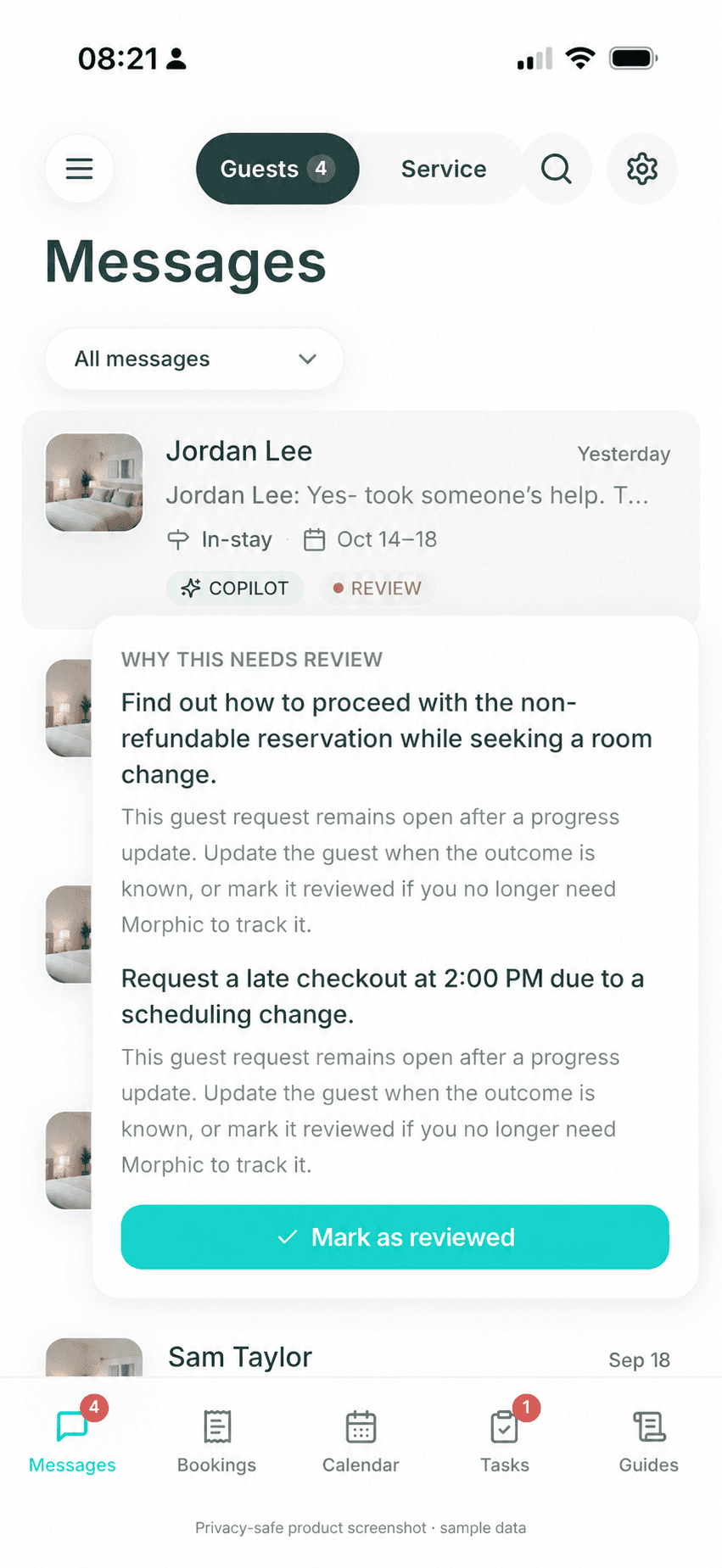
Representative illustration · synthetic data
The original request and reason for follow-up remain visible. Mark as reviewed means the host no longer needs Morphic to track it; it is not proof that a provider finished work or that a property is ready.
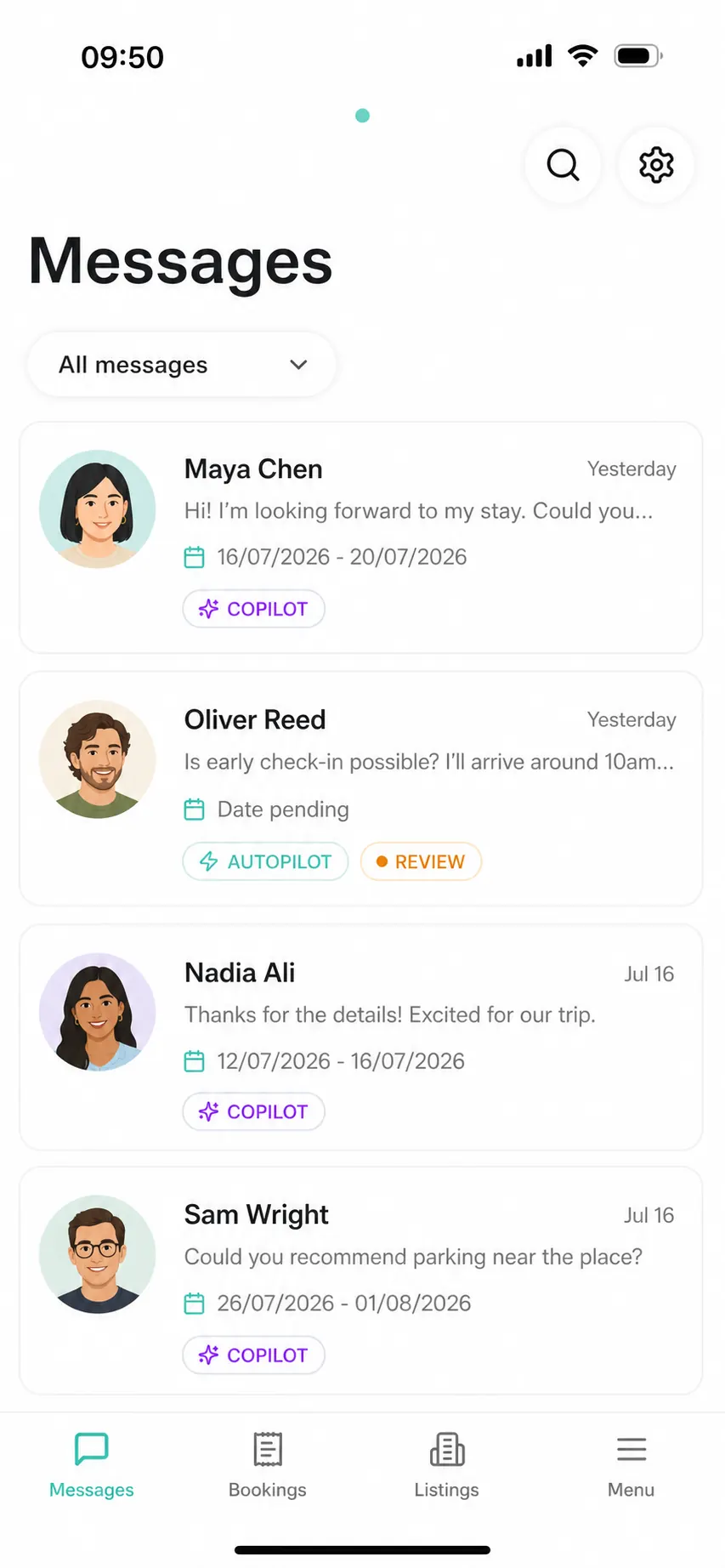
Morphic product screenshot
Copilot, autopilot, and review labels make the next action visible before the host opens a thread.
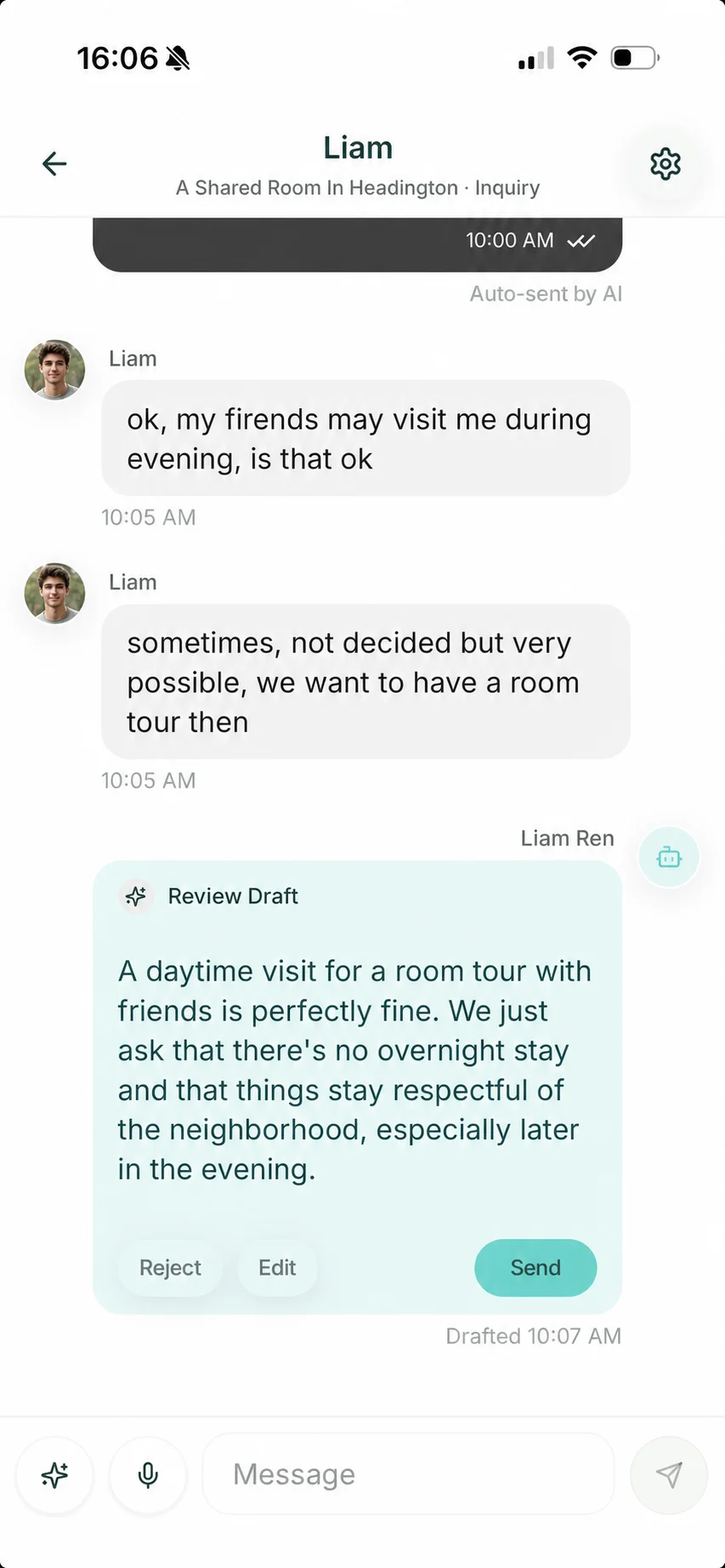
Morphic product screenshot
Morphic can prepare a guest-safe answer, while the host decides whether to send, edit, or reject it.
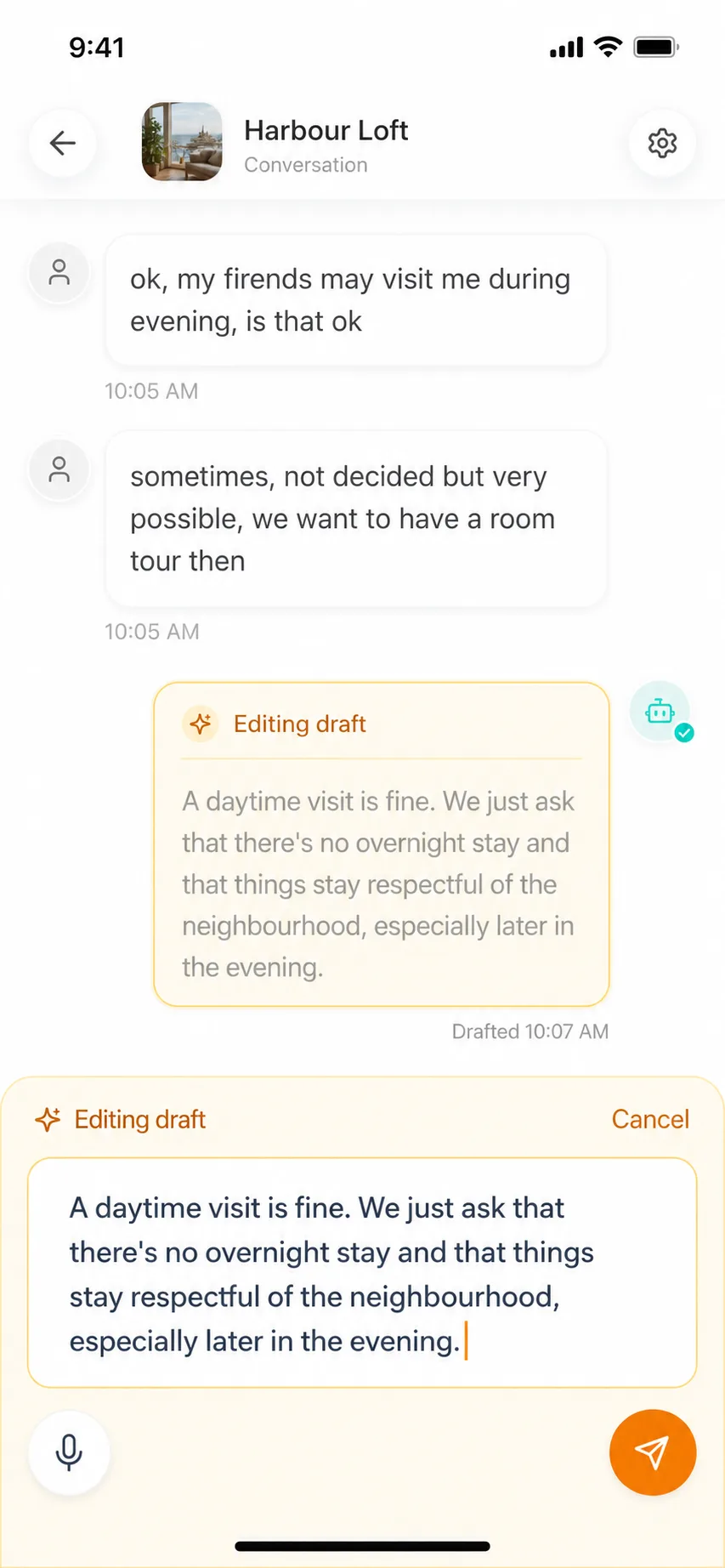
Morphic product screenshot
The host can change tone, details, or boundaries inside the conversation before sending.
20+
Hosts using Morphic
80%+
Replies prepared by Morphic
200+
Optimization suggestions and actions
4.82+
Average rating across connected listings
90%
Routine calendar & pricing coverage
The 90% figure is a dated system-coverage snapshot, not a claim of current Airbnb write access. Automatic application follows host-authorized messaging and turnover routines; calendar and pricing changes stay in Airbnb or your existing tools.
Setup order
Connect Airbnb and import your listings in about one minute. No manual AI Guide or rules setup is required to start; keep Airbnb and any existing PMS; no migration is required.
Start in Copilot and review replies grounded in imported listing and booking context. Add or correct facts when needed; optional AI Guides refine future answers rather than block setup.
Enable Autopilot for routines you trust using natural-language instructions. Keep useful native Airbnb scheduled messages, and review overlapping timing so guests do not receive redundant updates.
Pause before sending any message that depends on refunds, access, safety, cleaning status, damage, complaints, or policy exceptions.
If a guest need remains open after an acknowledgment, keep the source request and promised next step visible; a reply is not proof that a repair, service, or other real-world task is complete.
Review repeated guest questions and host edits, then improve the scheduled message, AI Guide, or listing guidance that caused the gap.
Platform references
These references support the workflow guidance on this page. Airbnb and vendor details can change, so hosts should verify current setup, pricing, and policy details at the source before buying.
FAQ
The short answer is usually a layer, not a yes/no: scheduled message, AI answer, draft, or host approval.
For scheduled reminders, use native Airbnb scheduled quick replies. Airbnb is also rolling out AI auto-replies, suggested actions, and priority messages, so check what your account already provides. To try Morphic, import your Airbnb context, review replies in Copilot, and enable trusted Autopilot routines. No manual Guide setup is required. Keep judgment-heavy promises under review and track requests that remain unresolved after a reply.
Airbnb automated messages often means scheduled templates, while Airbnb auto reply usually means responding to guest questions automatically. Morphic supports the AI-assisted auto-reply side with property context, host guidance, and review rules for risky situations.
Refunds, discounts, complaints, safety issues, access uncertainty, cleaning problems, damage, policy exceptions, and unclear property details should usually ask the host before making promises.
Morphic is built first for self-managing Airbnb hosts who connect directly and want better automated messages and AI replies without adding a PMS-owned Airbnb inbox. An existing PMS can stay in place; Morphic adds messaging and turnover follow-through without migration.
Yes. Checkout reminders, trash instructions, key return, parking reminders, and post-stay thank-you notes are good candidates for scheduled automated messages. AI should only step in when the guest asks a contextual question or when an exception needs host review.
Use this page to decide what belongs in Airbnb scheduled messages, what belongs in AI replies, and what needs host review. Use the longer Morphic blog guide when you want a step-by-step setup checklist for templates, drafts, and pause rules.
Lightweight pilot
If this workflow matches the problem you are trying to fix, connect every Airbnb listing during the trial and use the same assistant for guest answers, host review, and booking-improvement signals from WhatsApp, the mobile app, or the web.
21 days free. No card required. Connect every Airbnb listing during the trial, then pay $9.90/listing/month for early small-host users; regular pricing is $12/listing/month.
Read next
Use a three-message arrival sequence while keeping access codes, cleaning status, and early check-in promises with the host.
ReadAirbnb guest messaging software for contextual replies, scheduled updates and unresolved-request follow-up. Copilot or Autopilot; $9.90/listing after a 21-day trial.
ReadAirbnb automation software for small hosts: decide whether to automate messages, AI replies, PMS work, pricing, turnover, smart locks, or host review first.
ReadAI guest service for Airbnb hosts: answer with house knowledge, spot repeated-question gaps, and ask the host before risky decisions.
Read