What messages-only access covers
Guest conversations in, calendar control out.
The mode you pick in Morphic decides what Morphic does with your Airbnb account. In Hosting assistant mode it works with guest conversations and booking context only, so it can sit next to whatever already manages your calendar.
| Task | Hosting assistant |
|---|---|
| Read Airbnb guest conversations and reply from Morphic | Included |
| Booking and stay context for each conversation | Included |
| Copilot drafts, Autopilot for trusted routines, Manual takeover | Included |
| Airbnb and connected WhatsApp conversations in one inbox | Included |
| Cleaning and service coordination through WhatsApp | Included |
| Change availability, minimum stay, or prices | Not included · Full management |
| Approve or decline booking requests | Not included · Shown read-only; respond in Airbnb |
| Write and submit guest reviews | Not included · Full management |
Before you start
A Morphic account
Sign up, then open setup. No PMS or channel manager is required.
Before you start
Your Airbnb host login
Use the Airbnb account that hosts the listings you want Morphic to help with.
Before you start
Who sends scheduled messages
If Airbnb, a PMS, or another tool already sends scheduled messages, decide which one keeps sending to avoid duplicates.
Step by step
How to connect Airbnb in Hosting assistant mode
- 1
Open setup and check the workspace
Sign in to Morphic and open setup at Step 1, Make Your Assistant Useful. The workspace is shown above the Airbnb card. If you belong to more than one team, choose the workspace first: listings, guides, and billing belong to it.
- 2
Select Hosting assistant and click Connect hosting assistant
On the Connect Airbnb card, choose Hosting assistant (marked Recommended). This is the messages-only mode: Morphic works with guest messages and booking context, and calendar and pricing stay in Airbnb or your current software. Then click Connect hosting assistant.
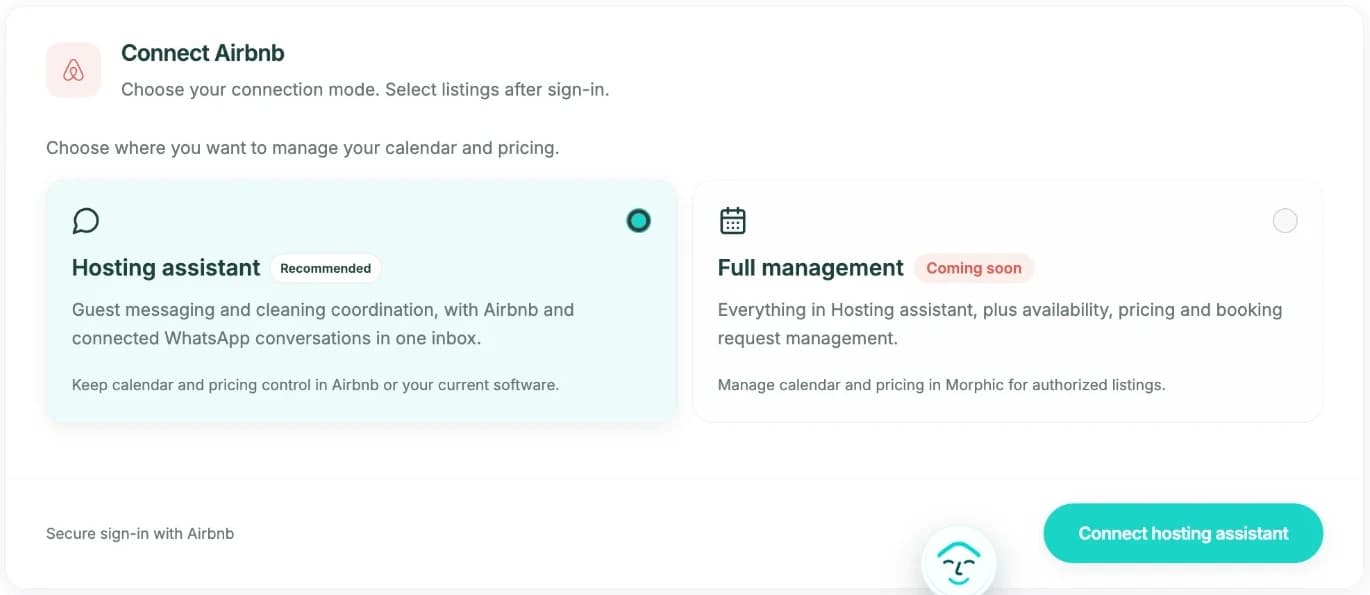
The Connect Airbnb card in Morphic setup. Full management currently shows Coming soon. - 3
Approve the connection on Airbnb
Morphic opens Airbnb's own authorization page. Sign in there if asked, using the Airbnb account that hosts your listings, and approve the connection. Morphic never sees your Airbnb password.
- 4
Confirm it is the right Airbnb account
Next you see a short check titled "Is this the right Airbnb account?" with the Airbnb profile you just authorized. Click Yes, this is me. If it shows the wrong profile, choose Use a different account and sign in again on Airbnb.
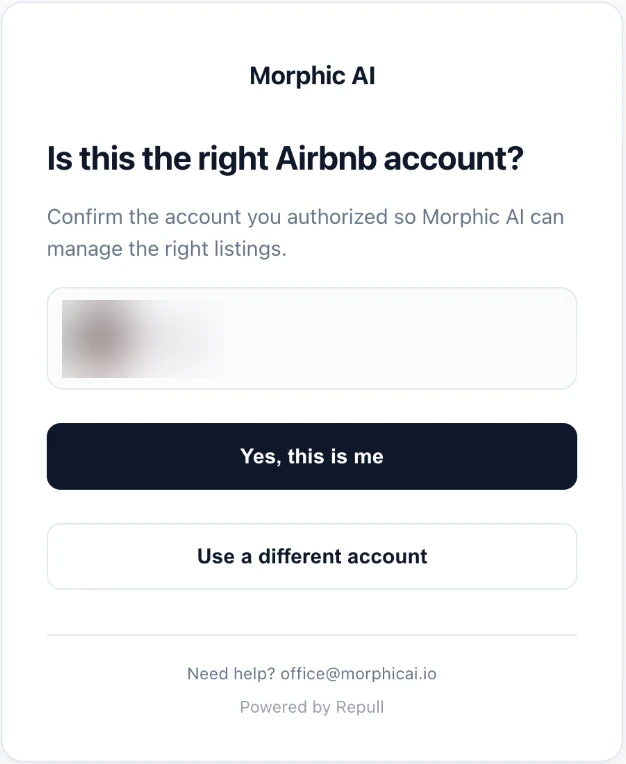
Account confirmation. The Airbnb profile is blurred in this example. - 5
Choose the listings to connect
Back in Morphic, the card shows Airbnb connected with a Hosting assistant badge. Click Connect on each listing you want, or Connect all. Imports run in the background, so you can continue while they finish.
- 6
Finish setup and pick a reply mode
Click Next to put the assistant on your phone, then open Messages and keep new conversations in Copilot until you trust the drafts. Copilot only sends after you approve.
After you connect
History is imported for context. Nothing is sent on its own.
Past conversations are imported so the assistant understands each guest and booking. Imported history never creates AI drafts or replies.
New guest messages follow the AI Reply default in message settings. Start in Copilot: Morphic drafts, you approve before anything is sent.
Your calendar is not touched. There is no calendar takeover step in Hosting assistant mode, and Airbnb Smart Pricing or your pricing tool keeps running.
Changing mode later
Move to Full management only if Morphic should own the calendar.
Full management currently shows Coming soon for new connections, so start with Hosting assistant. When it opens, Change mode / Reauthorize on the connected Airbnb card sends you back through Airbnb authorization with a different mode. Full management adds availability, pricing, and booking request management, moves calendar control to Morphic, and may conflict with a PMS or channel manager you already use. Each listing also needs Airbnb API sync enabled for availability and pricing edits. Stay on Hosting assistant if another tool should keep the calendar.
Troubleshooting
What the setup messages mean
- “No listings found yet”
- If you have just connected, listing data can take a few minutes to appear. Wait, then reload setup.
- “Unable to load your Airbnb connection”
- Click Try again. A failed status check never disconnects you; your saved setup is unchanged.
- “Automatic checks have paused”
- The connection service is rate limited. Morphic shows when to retry; nothing in your setup was changed.
- “Is this the right Airbnb account?”
- This check shows the Airbnb profile you just approved. If it is not the account that hosts your listings, choose Use a different account and sign in on Airbnb with the right one.
- “Connection options changed”
- The available modes changed while the page was open. Refresh the page, then connect again.
- “A listing is still importing”
- Queued listings finish in the background. You can click Next and keep going.
Still stuck? Contact support with the listing name and a screenshot of the setup card.
FAQ
Messages-only Airbnb connection questions
What does messages-only access mean in Morphic?
It is the Hosting assistant connection mode. Morphic reads your Airbnb guest conversations and booking context and sends replies you approve or allow. In this mode Morphic does not change your calendar, availability, or prices.
Will connecting change my Airbnb calendar or prices?
No. In Hosting assistant mode Morphic does not take over calendar control, and Smart Pricing, PriceLabs, or your PMS keep working as they do today. Calendar and pricing control only exist in Full management, which you would have to choose separately.
Do I need a PMS, and can I keep the one I have?
You do not need a PMS. If you already use one, or a dynamic-pricing tool such as PriceLabs, you can keep it: messages-only access does not compete with it for the calendar. Check which system sends scheduled guest messages so guests do not get duplicates.
Will Morphic reply to old guest messages after I connect?
No. Conversation history is imported so the assistant has context, but imported history never creates AI drafts or replies. Only new guest messages after the connection are handled, using the reply mode you choose.
Can I switch to Full management later?
Full management currently shows Coming soon for new connections. When it opens, use Change mode / Reauthorize on the connected Airbnb card. That mode moves calendar control to Morphic and may conflict with existing property management software, and each listing needs Airbnb API sync enabled for availability and pricing edits.
How many listings can I connect?
Connect any listing from the Airbnb account you authorized, one at a time or with Connect all. You need at least one connected listing to continue setup.
Next steps