Airbnb native tools
You mainly need predictable arrival, checkout, or review messages.
Start with scheduled quick replies. Check which AI features are available in your account.
Set up native messagesAirbnb automation software
Choose the software for the job: native Airbnb tools for scheduled messages, Morphic for contextual guest conversations and host-controlled actions, a PMS for multi-channel operations, and specialists for pricing, hardware, or local service. Then configure one workflow and check its result before expanding.
Every listing gets a 21-day trial, no card required. Launch price: $9.90 per connected listing/month, with no separate PMS or external AI subscription required.
Choose the job before the software. Native Airbnb tools can be enough for scheduled messages; Morphic connects contextual guest work and host-controlled actions; a PMS serves multi-channel operations; specialists and people handle pricing, hardware, and local service.
You mainly need predictable arrival, checkout, or review messages.
Start with scheduled quick replies. Check which AI features are available in your account.
Set up native messagesGuest questions, booking context, host decisions, and follow-up need to stay connected.
For a direct Airbnb connection: use Copilot or authorize trusted Autopilot routines. People still carry out local work.
See the host assistantYour constraint is multiple booking channels, owner reporting, accounting, or direct bookings.
Keep your PMS as the system of record for those jobs. Add Morphic for Airbnb messaging and turnover coordination without migrating your existing setup.
Compare the operating stacksYou need revenue optimization, smart-lock hardware, a cleaner marketplace, or on-site inspections.
Use the appropriate specialist or local team. Sending a request does not establish that physical work is complete.
Compare tools by their jobChoosing between named products? Read the tool comparison. Once you have chosen the operating layer, use the workflow below to configure and check one job.
Start where a recurring failure affects the stay. For predictable instructions, use Airbnb’s scheduled quick replies. For changing questions and follow-up, use an assistant. For multiple booking channels or access hardware, use a PMS or the appropriate specialist. Keep one system responsible for each send or update so overlapping rules do not duplicate it.
Start with one booking-linked job. Write down the trigger, listing, control mode, and expected result. In a demo or a review-only workflow, check these three situations before enabling a live routine. These are evaluation steps, not a claim that every tool handles every situation automatically.
Check the recipient, property, local time, and actual message or action result. A proposed action is not evidence that it ran.
Check what happens when dates change or the stay is cancelled. Look for stale arrival instructions, duplicate sends, and cleaner requests tied to the old checkout.
Leave a sample provider request unconfirmed. Check who is notified, where the pending work appears, and how a person follows up before the next arrival.
Keep a simple record: expected result, observed result, and the correction needed. Use Copilot to review proposals; move the routine to Autopilot when its behavior fits your operation.
Workflow map
Use the lightest layer that can complete the job truthfully. Copilot prepares new or uncertain work for review. Autopilot is for trusted routines the host has authorized. People still own physical work, local judgment, safety, compensation, and specialist systems.
Morphic can coordinate an authorized cleaner by WhatsApp and follow up for confirmation; it does not clean, inspect, repair, or claim that physical readiness is verified without a responsible person's confirmation.
Morphic evidence
These representative screens show guest attention, reservation-linked cleaning status, reviewed replies, service assignments, and open tasks. A sent update is not a resolved request, and an arranged cleaner is not proof that the home is ready.
Start your free trialInside Morphic
From inbox signal to host-controlled send
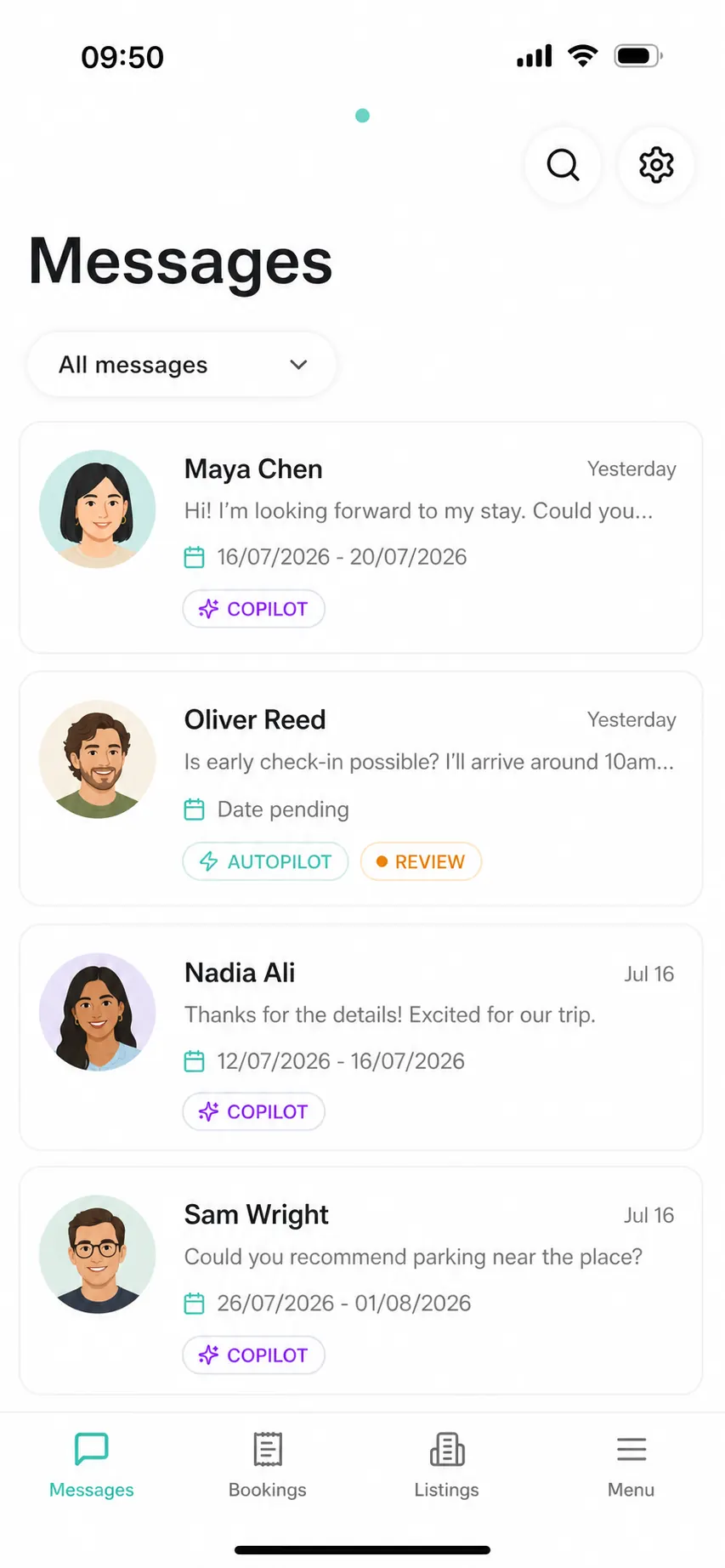
Inbox signal
Copilot, autopilot, and review labels make the next action visible before the host opens a thread.
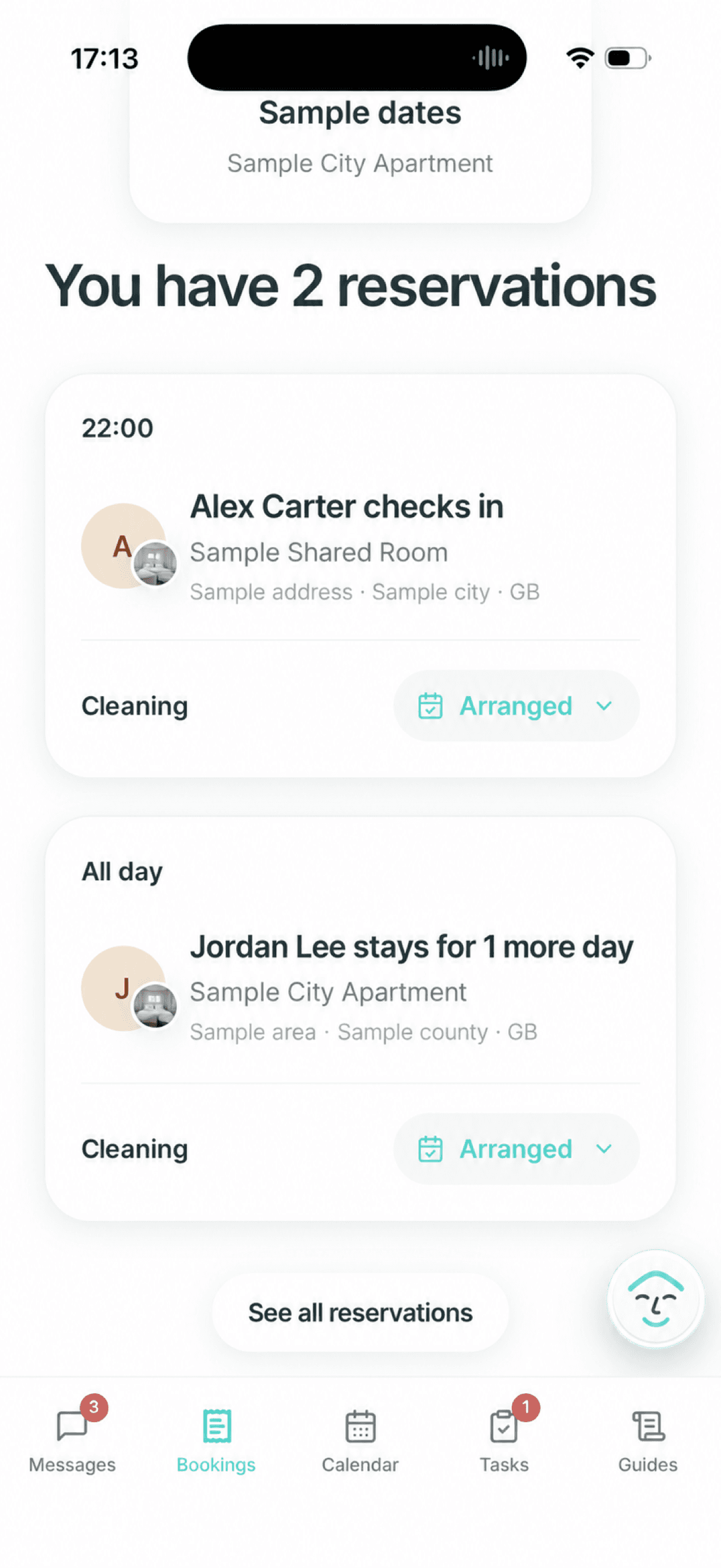
Reservation and cleaning status
A reservation can carry its cleaning status, so the host can see an arranged turnover alongside the booking before making a guest-facing timing decision.
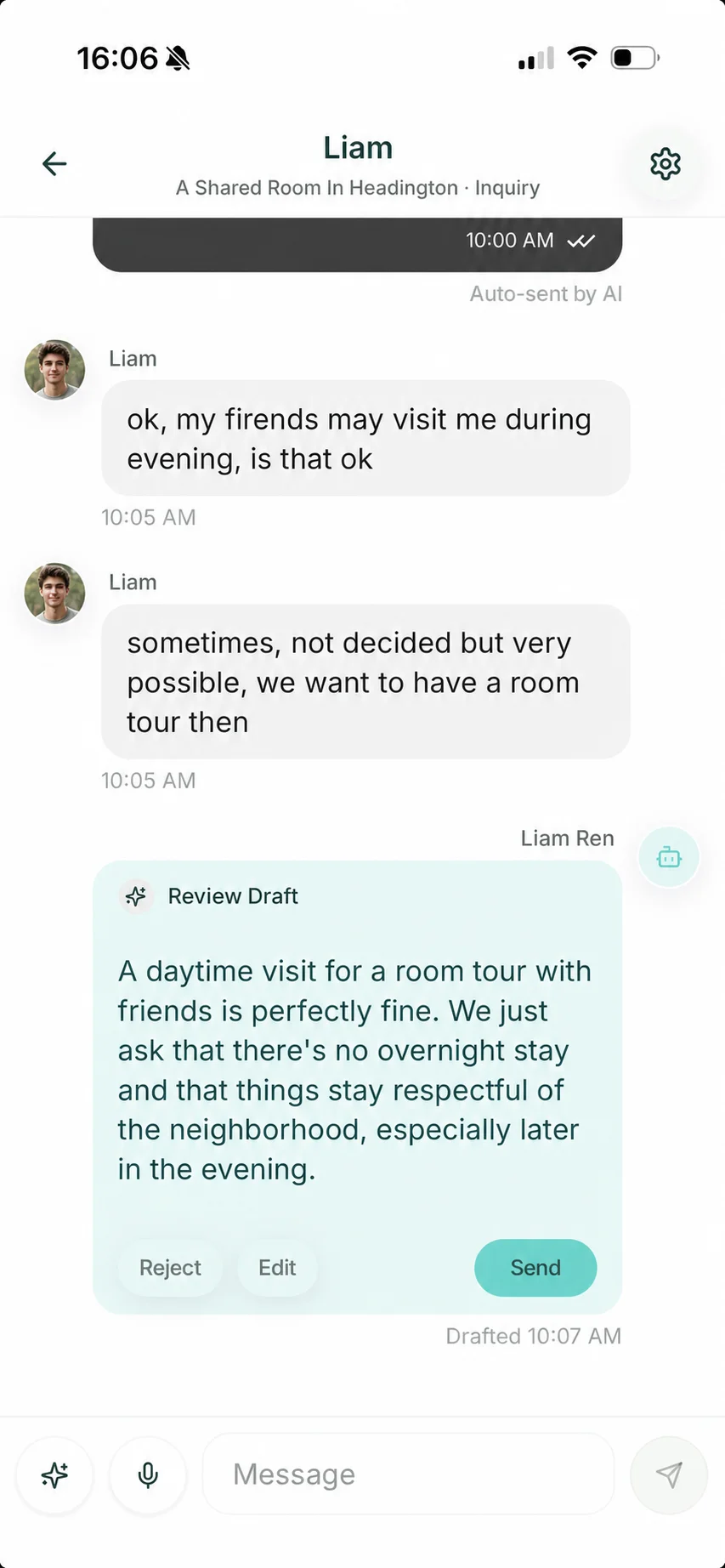
Review draft
Morphic can prepare a guest-safe answer, while the host decides whether to send, edit, or reject it.
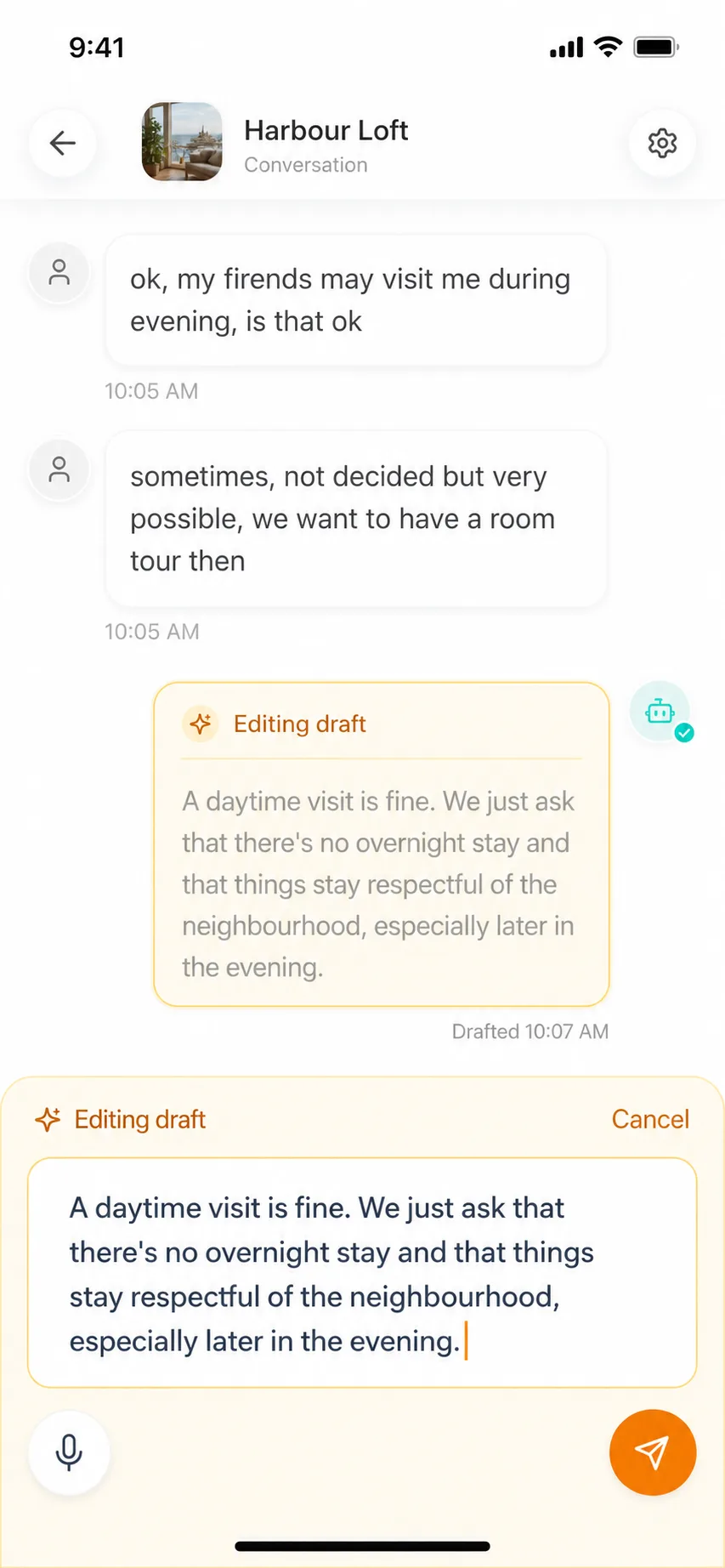
Edit before send
The host can change tone, details, or boundaries inside the conversation before sending.
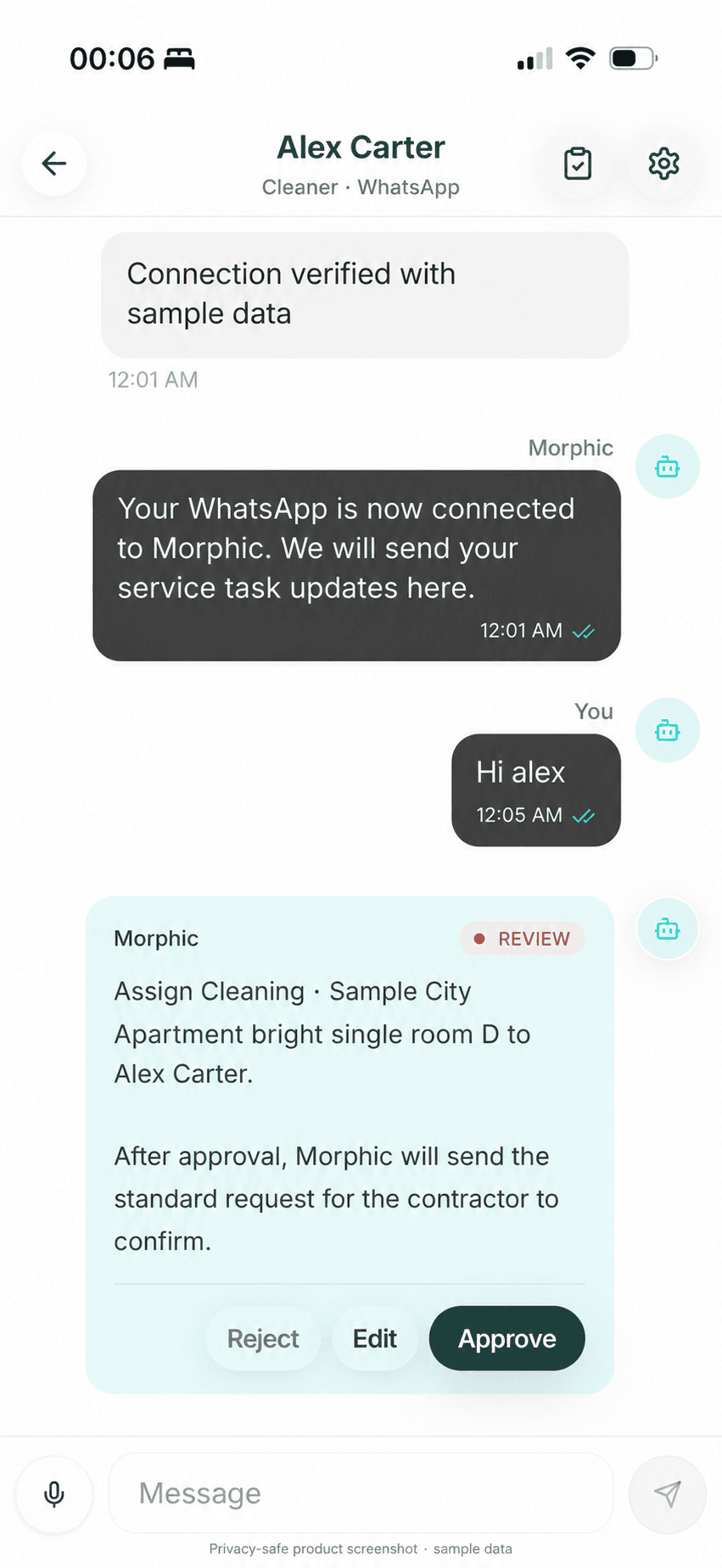
Service approval
The host can reject, edit, or approve a service assignment while the responsible person and listing context stay visible.
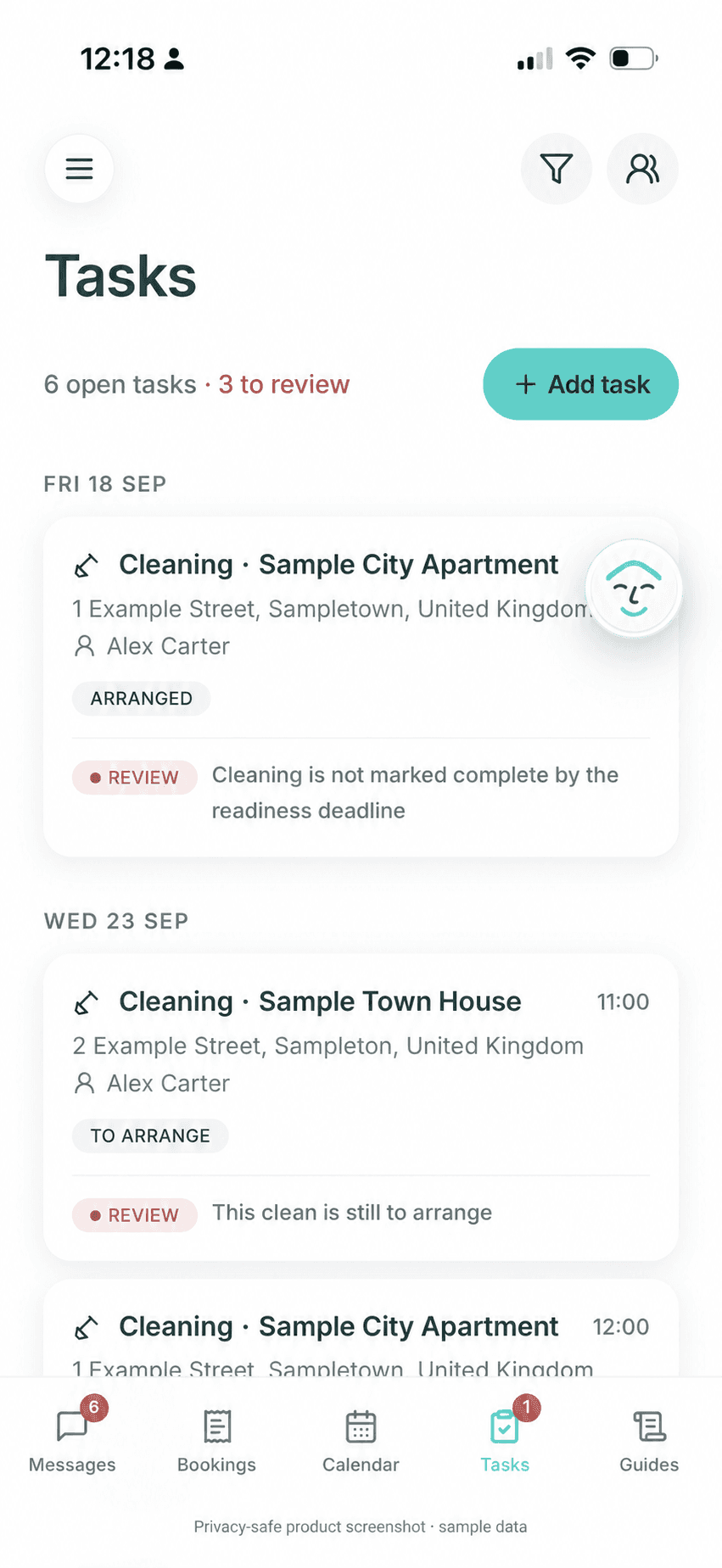
Task follow-through
A task can be arranged yet still need review at the readiness deadline; provider coordination is not presented as proof of physical completion.
Airbnb-first
Morphic supports the official guest thread instead of pushing guests into a separate app or guide-only channel.
Host control
The host can inspect the guest question, adjust the suggested reply, and decide whether it is safe to send.
Safety
Early check-in, cleaning uncertainty, access, complaints, refunds, and policy exceptions should ask the host first.
Platform references
These references support the workflow guidance on this page. Airbnb and vendor details can change, so hosts should verify current setup, pricing, and policy details at the source before buying.
FAQ
Choose an achievable first workflow, check the result, and expand only when the routine works for your property.
Hands-on hosts should start with the workflow that creates the most visible guest friction. In many cases that is guest communication: scheduled messages, repeated questions, AI reply drafts, and host review rules. Pricing, smart locks, cleaning, and PMS workflows can come later if they are the actual bottleneck.
The best first automation is the workflow that removes guest-facing friction without taking away host judgment. For Morphic, that can mean guest messages, AI auto replies, booking-confidence insights, one assistant across mobile, WhatsApp, and the web, booking and calendar checks (read-only in messaging mode), approved AI Guide updates, and checkout-to-cleaner coordination. In messaging mode, pricing, calendar, and public listing changes stay in Airbnb or the existing tools; Full Management requires its own supported permissions and review. It does not replace a cleaner, field inspection, dedicated dynamic-pricing engine, or full PMS operations.
No. Message automation is one part of Airbnb automation. Broader automation can include guest replies, booking improvement insights, assistant conversations across mobile, WhatsApp, and web, calendar or booking actions, pricing, cleaning, smart locks, and PMS workflows. Use the dedicated automated-messages page when the message workflow is the specific problem.
It may refer to scheduled messages, auto replies, pricing rules, smart-lock access, cleaning coordination, calendar sync, or PMS workflows. A hands-on host should first decide which workflow creates the most guest-facing friction, then choose the narrowest tool that solves that problem without removing host control.
For a hands-on host with a direct Airbnb connection, Airbnb automation software should usually start with guest-facing work: scheduled messages, AI reply drafts, house-specific answers, checkout reminders, entry guidance, host review before risky decisions, lightweight booking, calendar, listing, or AI Guide actions, and a known cleaner handoff after checkout. Broader PMS, pricing, field-operations, and channel-management systems can come later if those are the real bottlenecks.
Airbnb automation services can mean an agency configuring workflows, a PMS or specialist tool, or software that automates host work. Compare what is actually delivered: guest replies, booking and calendar actions, pricing, smart locks, cleaner coordination, reporting, local execution, or human support. Morphic is the software layer for self-managing hosts: it imports Airbnb in about 1 minute, starts in Copilot, lets trusted routines move to Autopilot, and keeps physical work and risky decisions with people.
A useful automation system should connect inquiry and reservation requests to pre-arrival, arrival, in-stay questions, issue triage, checkout, cleaner follow-up, reviews, and listing improvement. Morphic can carry context across that Airbnb-first lifecycle and surface the next supported action, but it does not inspect, clean, repair, handle emergencies, or independently certify that a property is ready.
A date-anchored routine should use the current reservation as its authority. When dates change or a booking is cancelled, Morphic can recalculate, stop, or return the affected routine for host review instead of continuing from stale timing. Copilot remains the default, and only host-authorized trusted routines move to Autopilot.
Yes. The mobile app, WhatsApp, and web reach the same assistant for conversation, draft review, thread summaries, reply mode changes, AI Guide updates, and simple booking, calendar, or listing checks. The host can switch surfaces without losing context, rather than operating another PMS inbox.
Yes. For a known cleaner or teammate, Morphic can use the checkout and next-arrival context to coordinate the handoff, contact the responsible person through WhatsApp, follow up for confirmation, and surface an exception to the host. Copilot keeps the routine reviewable by default; Autopilot applies only to a trusted routine the host has explicitly authorized. Morphic does not clean, inspect, repair, or treat a message as proof that a property is physically guest-ready.
Not safely. Software can automate messages, reminders, pricing rules, smart-lock timing, and some operations, but cleaning, inspections, repairs, access failures, complaints, refunds, safety issues, and local hospitality still need a host, local person, or clear human escalation path.
A new host can start with scheduled checkout reminders, clear house rules, trash and key-return instructions, and a follow-up message after departure. AI can help answer checkout questions and flag exceptions, but refund, damage, complaint, or late-checkout decisions should still ask the host.
Guest entry automation should use approved arrival instructions, gate-code timing rules, parking guidance, and a safe fallback if access fails. AI can explain known entry steps, but it should not expose sensitive access details too early or promise access changes without host approval.
No. Automation can help with software work and guest communication, but cleaning, inspection, repairs, emergencies, and local hospitality still need the host or local people.
Lightweight pilot
If this workflow matches the problem you are trying to fix, connect every Airbnb listing during the trial and use the same assistant for guest answers, host review, and booking-improvement signals from WhatsApp, the mobile app, or the web.
21 days free. No card required. Connect every Airbnb listing during the trial, then pay $9.90/listing/month for early small-host users; regular pricing is $12/listing/month.
Read next
Check the dated approval, execution, and retained-correction records. These explain product mechanisms and system coverage, not customer revenue or time-saving outcomes.
ReadUse a booking-linked state model for a known cleaner handoff without turning a WhatsApp message into false proof of physical readiness.
ReadDefine when a routine should run, recalculate, stop, or return to the host as a reservation changes.
ReadUse the broader assistant page for messages, booking and calendar (read-only in messaging mode) context, approved guidance, turnover tasks, and host follow-up.
ReadUse the messaging page when contextual guest answers and host review are the first automation bottleneck.
Read