AI Assistant for Airbnb: Automate Daily Work Without Giving Up Control
Ask what needs attention, check a booking or calendar, or improve guidance from guest feedback. Morphic uses listing and stay context across daily host work, with Copilot review or trusted Autopilot routines through text or voice on mobile, WhatsApp and web.
$9.90/listing · no separate PMS or AI subscription
What does an Airbnb AI assistant do for the host?
An Airbnb AI assistant helps a host answer guests, check bookings and calendars, coordinate follow-up, and improve listing information using the relevant property and stay context. Morphic brings those jobs into one assistant: ask by text or voice, review replies and actions in Copilot, or automate trusted routines with Autopilot. Check the resulting conversation or record to see what changed. Morphic is independent host software, not Airbnb customer support.
Give the assistant a specific job and check what changed.
Start with a guest reply, today’s priorities or a cleaner handoff; expand the additional examples for calendar decisions and listing improvements. These are illustrative workflows, not customer transcripts or measured outcomes. Each example names the record to check.
Draft a grounded guest reply
“Draft a reply to the parking question, and show me the listing information you used.”
Assistant action
Morphic uses the relevant stay and listing context to prepare the reply. Review the parking details in the draft; correct missing information before sending instead of approving a guess. Copilot lets you approve the draft, while Autopilot handles trusted replies under your instructions.
Check the result
After sending, open the guest thread and check the actual message and delivery state. Correct missing parking facts before reusing the answer.
What can go wrong and what to learn
Test context, useful action, and the recorded result—not whether a chatbot can write fluent text.
Morning host check-in
“What needs attention at Oceanview today? Show unfinished guest requests and cleaning tasks awaiting confirmation.”
Assistant action
Start with the attention summary, open the relevant Guest or Service conversation, and inspect the proposed next step. An acknowledged guest request may still need a decision; a cleaning request may still be waiting for the provider. Review each item in its conversation or task record rather than treating the summary as proof that the work is finished.
Check the result
Open each unfinished item from the summary. Confirm who owns the next step and when an update is due; inspect the conversation or task record after it changes.
What can go wrong and what to learn
A dashboard shows many separate items, but the host still has to inspect each guest message, calendar change, and listing concern manually.
The assistant turns scattered hosting signals into one prioritized host workflow.
Arrange cleaning and check the acceptance
“Ask our cleaner to handle the next turnover. Has the timing been confirmed?”
Assistant action
Check the booking-linked cleaning task and proposed provider. Review, edit, reject, or approve the handoff in Copilot; use Autopilot for a trusted routine. Follow the provider conversation and task status to see whether the request was sent and accepted.
Check the result
Check the Service conversation and Tasks record for acceptance and timing. Arranged means accepted, not physically complete. Completion needs the responsible person’s report; follow up on an overdue or unconfirmed task.
What can go wrong and what to learn
The guest receives an acknowledgment, but the provider conversation and unfinished promise disappear into a separate thread.
A useful host assistant distinguishes communication progress from verified real-world completion.
More jobs: calendar checks and listing improvements
Check the booking and calendar before changing dates
“Check this booking and the calendar before I decide whether to offer an extra night.”
Assistant action
Ask the assistant to check the reservation and calendar context for the named listing. Review the dates, availability and any proposed action before making an offer to the guest.
Check the result
Check the actual booking or calendar record after an approved change. A calendar check is not a confirmed reservation extension.
What can go wrong and what to learn
A fluent reply promises availability without checking the actual dates.
The same assistant connects the guest conversation to the record the decision depends on.
Guest questions reveal a listing gap
“Is there a proper desk and reliable Wi-Fi for remote work?”
Assistant action
Morphic answers from confirmed facts, then suggests a listing/AI Guide update if workspace proof keeps coming up.
Check the result
The host confirms the exact workspace claim before it becomes reusable guidance.
What can go wrong and what to learn
The host answers the guest once, but the same uncertainty remains for future searchers.
Guest support becomes growth work when repeated questions become approved listing fixes.
Morphic host assistant
Inspect the host workspace behind the assistant.
These representative illustrations use synthetic data to show the capability workspace, open guest requests, and service review. They explain where you check the work; they are not a recorded assistant conversation or a customer outcome.
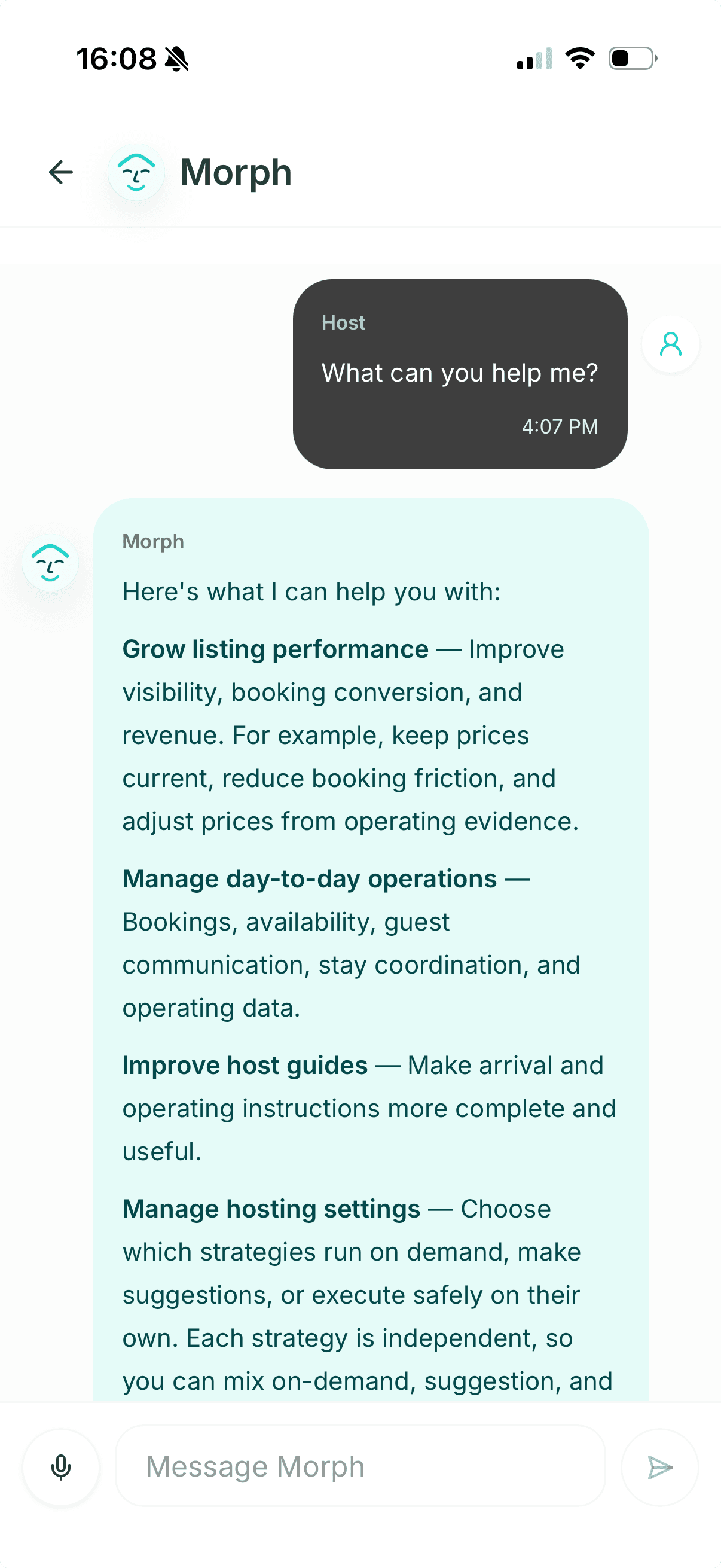
Ask the assistant about the whole hosting workflow.
The host assistant connects listing improvement, bookings, guest communication, stay coordination, guides, and hosting settings instead of treating them as isolated tools.
2
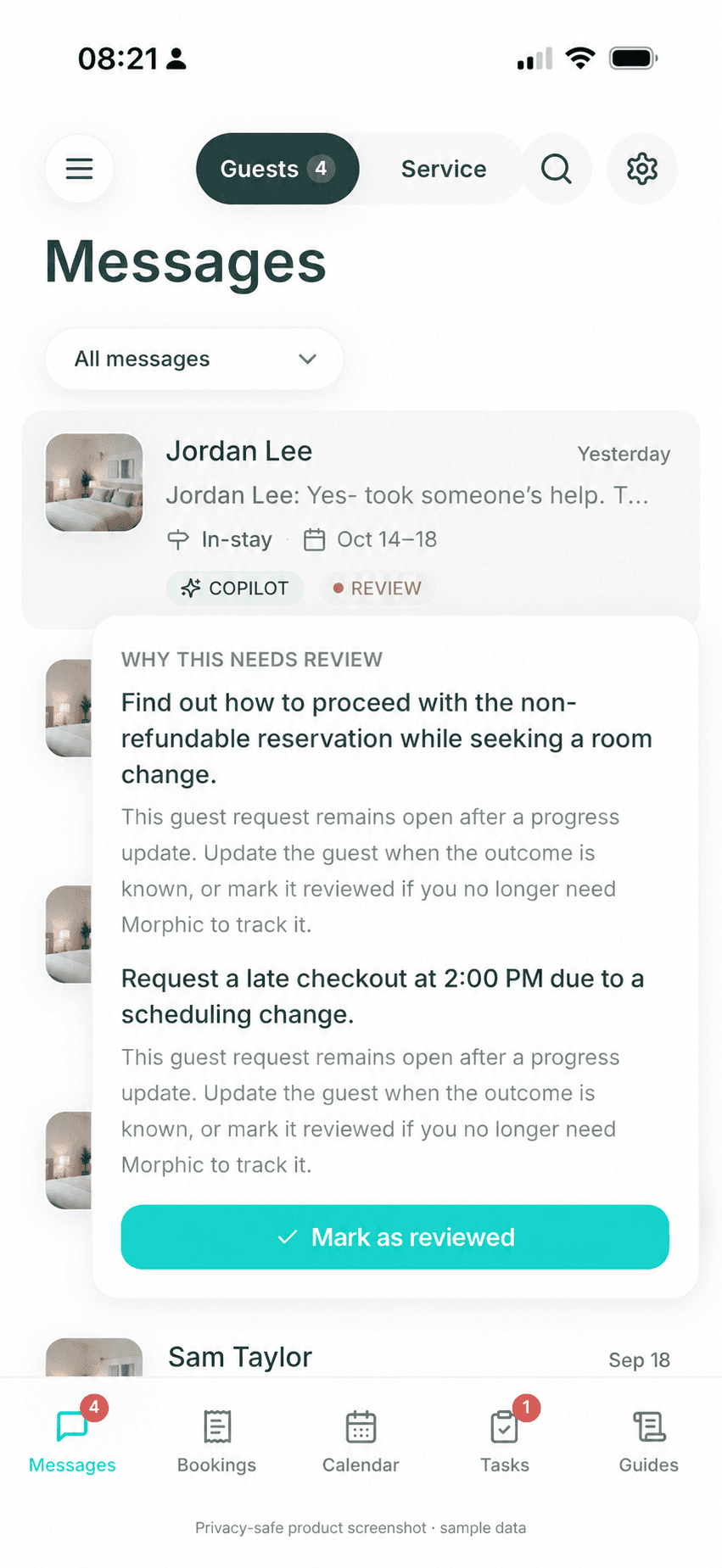
Guest attention
Keep an acknowledged request open until the next step is known.
The review reason explains why the guest request still needs host attention instead of disappearing after a progress reply.
3
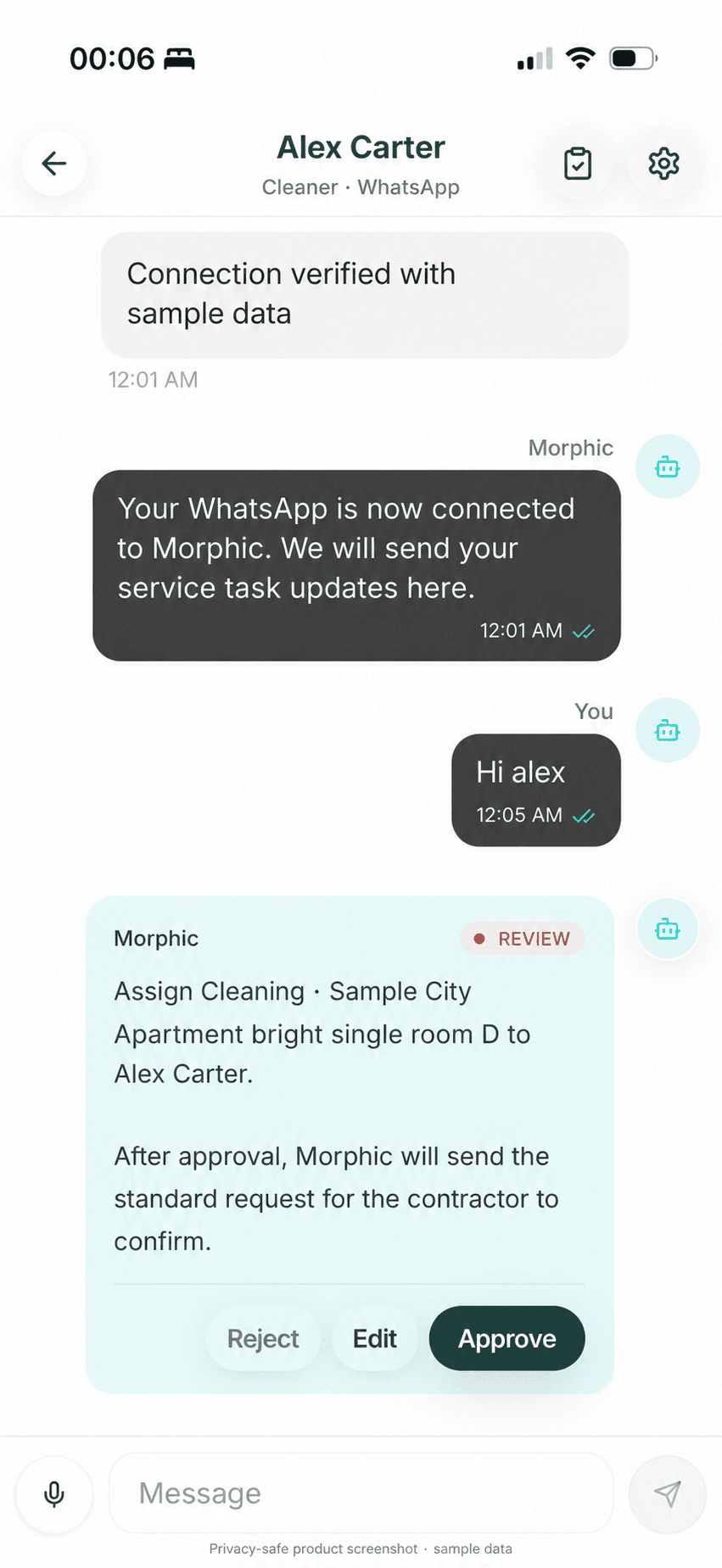
Service attention
Move the follow-up to the responsible provider without losing host control.
Morphic keeps the service conversation, assignment, listing context, and approval point together.
Ask
Name the listing and the job
Use text or voice to ask about a booking, draft a reply, check the calendar or review guest feedback.
Act
Review or run the next step
Inspect replies and actions in Copilot or use Autopilot for trusted routines under your instructions.
Check
Inspect the record that changed
Check the message, booking, calendar or guidance record; follow unfinished requests and retain confirmed corrections.
A practical assistant trial
Test an Airbnb AI assistant from request to result.
Choose one listing and ask by text or voice: “What needs attention today?” Then choose one reply, booking or calendar check, or improvement to work through. This is a suggested trial, not a recorded customer case or a guaranteed assistant transcript.
1. Choose the listing and check the context
Ask what needs attention today, then confirm the listing, stay and dates in the answer. Generic hosting advice is not enough.
2. Give one concrete instruction
Pick one scenario above and ask for a specific result. Check the facts used; missing information should remain a question, not become a guess.
3. Review or automate the next step
Approve, edit or reject the proposal in Copilot, or test a trusted routine in Autopilot. Approval permits an action; it does not prove completion.
4. Check the result and retain the correction
Open the actual message, calendar or task record. For a repeated parking question, confirm the instructions, approve the AI Guide correction and check a later answer. Keep physical completion with the responsible person: sent, changed and resolved are different outcomes.
Both Copilot and Autopilot support the workflow. Test the result before expanding a routine. The representative screenshots above illustrate these controls, not one continuous completed job.
Do you need an assistant, native tools, a PMS or a person?
Choose by the work you need to delegate. An AI assistant fits contextual digital work; predictable messages, broad back-office operations and physical service have different requirements.
01
Best fit
Use an AI host assistant when daily host work is fragmented
Morphic fits hosts who bounce between messages, listing gaps, bookings, calendar, pricing, reviews, tasks, performance, and team follow-up but do not want a full PMS just to stay on top of it.
02
Native tools
Keep predictable messages in Airbnb when that is enough
Use Airbnb quick replies and scheduled messages when the facts and timing are stable. Check which AI features your account actually offers before buying another tool. Add an assistant when the work needs stay context, a decision or follow-up beyond a scheduled send.
03
Host control
Keep sensitive work reviewed by the host
The assistant can collect context and prepare the next step, but refunds, complaints, access, cleaning status, safety, damage, and policy exceptions should pause for host judgment.
04
System boundary
Choose a full PMS when distribution or finance is the constraint
Broad multi-channel distribution, owner accounting, direct booking, and deep vendor workflows remain full-PMS jobs. Morphic owns the Airbnb-first assistant experience across daily operations and improvement.
05
VA boundary
Choose AI software, a human VA, or a local co-host by task
Morphic fits repeatable digital work such as guest communication, calendar and pricing actions, reviews, guidance, and team follow-up. Use a human VA for flexible remote work that needs human judgment, and a local co-host or manager for inspections, emergencies, repairs, and physical guest service.
Explore guides, listing insights, and approval controls
How Morphic handles this
Inspect the feature pieces behind the assistant.
These feature notes show how Morphic combines messages, bookings, calendar, pricing, reviews, tasks, performance, AI Guides, Listing Insights, team context, and controlled actions.
These references support the workflow guidance on this page. Airbnb and vendor details can change, so hosts should verify current setup, pricing, and policy details at the source before buying.
Use these answers to separate a host assistant from a PMS, a local co-host, a guest guide, or an unrestricted auto-reply bot.
Is Airbnb’s own AI assistant the same as an AI assistant for hosts?
Not necessarily. Airbnb’s customer-support AI helps users with Airbnb support questions. Native host messaging features help with guest replies inside Airbnb. A third-party host assistant such as Morphic helps the host work across guest conversations, booking and calendar context, guidance and follow-up. Compare the actual job rather than the AI label. Morphic is independent software, not Airbnb customer support; check Airbnb’s current Help Center and your account for native feature availability.
What is an AI host assistant for Airbnb?
An AI host assistant is always-available software that helps an Airbnb host understand, operate, and improve the business. Morphic covers messages, listings, bookings, calendar, pricing, reviews, tasks, performance, team context, AI Guides, and controlled actions through one assistant.
What should I ask an Airbnb AI assistant first?
Start with one listing and one clear request: “What needs attention today?” Then choose a concrete job: draft a guest reply, check booking dates against the calendar, or identify a listing improvement from guest feedback. Review the proposed reply, action or recommendation, then check the relevant conversation, booking, calendar or saved guidance. A suggestion is not a completed change. Use text or voice from Morphic mobile, web or its WhatsApp assistant.
What kind of Airbnb host assistance do I need?
Start with the job. Use native Airbnb tools when they already cover it; consider AI software for recurring digital work and follow-up, a human virtual assistant for flexible remote support, and a local co-host for visits and physical service. For an Airbnb account, payout, or platform dispute, contact Airbnb support—Morphic is independent software, not Airbnb customer support. You can combine software with people rather than delegate everything to one provider.
Is Morphic an AI agent for Airbnb hosts?
Yes. Morphic is an AI agent for Airbnb hosts when a host needs software to observe context, automate approved routine work, prepare actions, coordinate follow-up, and verify results. Its difference is host collaboration: switch between safe auto-replies, AI drafts, alerts, and direct takeover instead of handing every decision to fully autonomous automation.
Is Morphic an Airbnb virtual assistant?
Morphic is Airbnb virtual assistant software rather than a human VA or staffing service. It is available by text or voice to answer, advise, coordinate, and carry out supported host-controlled actions while physical hospitality work remains with people.
Can AI replace an Airbnb virtual assistant or co-host?
It depends on the work. Morphic can take on repeatable digital hosting work across messages, bookings, calendar, supported pricing actions, reviews, guidance, tasks, and team follow-up. A human VA remains useful for open-ended remote judgment, while a local co-host or property manager is still needed for inspections, emergencies, repairs, cleaning verification, and other physical work.
How is an AI host assistant different from an AI co-host?
The terms overlap. With Morphic, both mean software that helps with Airbnb messages and daily hosting work, not a person who visits the property. Use the assistant to ask what needs attention, review recommendations, and carry out supported actions. A local co-host or service provider still handles inspections, repairs, emergencies, and physical work.
Does Morphic replace a PMS?
Morphic can replace part of the daily workflow for Airbnb-first hosts, but it is not a full multi-channel PMS. Choose a PMS when owner accounting, direct booking, broad OTA distribution, or deep vendor operations are the main requirement.
Can a host use Morphic from WhatsApp, mobile, or web?
Yes. WhatsApp, the mobile app, and the web are host-side ways to reach the same Morphic assistant by text or voice. Hosts can review or edit drafts, approve or decline replies, ask for context, update guidance, and request supported actions. Guests do not need to move into any of these surfaces; the guest conversation can stay in Airbnb.
What should an AI host assistant not do?
It should not autonomously decide refunds, safety issues, access changes, cleaning status, damage, policy exceptions, emergencies, or local service recovery. Those moments should ask the host or local team.
What is a vacation rental AI assistant?
A vacation rental AI assistant helps a host understand guest messages, bookings, calendar context, listing gaps, and repeat work across one operating workflow. Morphic is narrower by design: it is an Airbnb-first assistant for self-managing hosts, starts in Copilot with review before supported actions, and does not replace a local co-host, cleaner, emergency operator, or full multi-channel PMS.
What can an AI host assistant do beyond guest messaging?
Beyond guest replies, Morphic can connect the same Airbnb context to booking-request review, calendar and availability checks, bounded pricing actions, reviews, AI Guide updates, Listing Insights, host tasks, team follow-up, and performance questions. The host can ask from mobile, WhatsApp, or web by text or voice, while refunds, access, safety, cleaning status, repairs, and policy exceptions remain human-reviewed.
How does Morphic separate guest messages from service follow-up?
Guest and Service attention are separate host-side views of the same operating context. A guest request can remain open while Morphic prepares or sends a provider message, shows its delivery state, and waits for the next responsible step. Provider confirmation proves coordination only; it does not prove that cleaning, maintenance, or a repair is complete.
Lightweight pilot
Start your 21-day free trial before moving into heavier software.
If this workflow matches the problem you are trying to fix, connect every Airbnb listing during the trial and use the same assistant for guest answers, host review, and booking-improvement signals from WhatsApp, the mobile app, or the web.
21 days free. No card required. Connect every Airbnb listing during the trial, then pay $9.90/listing/month for early small-host users; regular pricing is $12/listing/month.
Choose by the work you want to delegate. Use the task-and-permission checklist, handoff brief, and same-scope cost comparison before hiring help or choosing software.
Compare AI co-host software for the inquiry-to-review workflow: guest messages, booking and calendar context, cleaner handoffs, improvements, and the boundary with a human co-host.