
Airbnb Guidebook Template: House Manual & Local Tips
Copy an editable Airbnb guidebook template, keep private house details separate, and publish accurate local tips and guest instructions.
Written and reviewed by Liam, Founder, Morphic
Guide fit
Independent Airbnb hosts preparing a practical guest guide, house manual and local recommendations
Short answer
Use two templates: public local tips and a private house manual.
An Airbnb guidebook template should help guests find local recommendations and use your home. Airbnb separates these jobs: its native Guidebook is public, while the House manual is available only to confirmed guests. Copy the two templates below, then put each part in the appropriate place.
Local guide
Public recommendations
Places, neighborhoods and practical local tips. No access codes or private contacts.
House manual
Information for booked guests
Parking, Wi-Fi, appliances and property instructions, with the right sharing permissions.
Conversation
Questions and exceptions
A guide cannot approve early arrival or solve a broken lock. Keep a person and the next step clear.
Guidebook, house manual or welcome book?
Start with the guest’s question. Local recommendations and instructions for your home belong in different places—even when you combine them into one printed welcome book.
| Resource | What it helps a guest do | Who can see it? |
|---|---|---|
| Airbnb Guidebook | Find restaurants, shops, neighborhoods and local advice | Public on Airbnb; it can also be shared outside Airbnb |
| Airbnb House manual | Use the home: Wi-Fi, appliances, extra blankets and similar details | Guests with a confirmed reservation |
| Arrival and checkout instructions | Enter and leave the property using the saved instructions | Detailed check-in instructions appear 48 hours before check-in; checkout instructions are available before booking |
| Your own PDF, document or QR-linked welcome book | Combine useful information in a format you control | Depends on your document/link permissions; a QR code does not make a page private |
- Resource
- Airbnb Guidebook
- What it helps a guest do
- Find restaurants, shops, neighborhoods and local advice
- Who can see it?
- Public on Airbnb; it can also be shared outside Airbnb
- Resource
- Airbnb House manual
- What it helps a guest do
- Use the home: Wi-Fi, appliances, extra blankets and similar details
- Who can see it?
- Guests with a confirmed reservation
- Resource
- Arrival and checkout instructions
- What it helps a guest do
- Enter and leave the property using the saved instructions
- Who can see it?
- Detailed check-in instructions appear 48 hours before check-in; checkout instructions are available before booking
- Resource
- Your own PDF, document or QR-linked welcome book
- What it helps a guest do
- Combine useful information in a format you control
- Who can see it?
- Depends on your document/link permissions; a QR code does not make a page private
These visibility distinctions come from Airbnb’s Guidebook, House manual and arrival/checkout Help pages, checked October 12, 2026. A generic welcome-book label does not change those controls.
For a small, predictable property, Airbnb’s native tools may be enough. Choose an external digital guide for a concrete need such as a different presentation or shared content across platforms—not because a template requires another subscription.
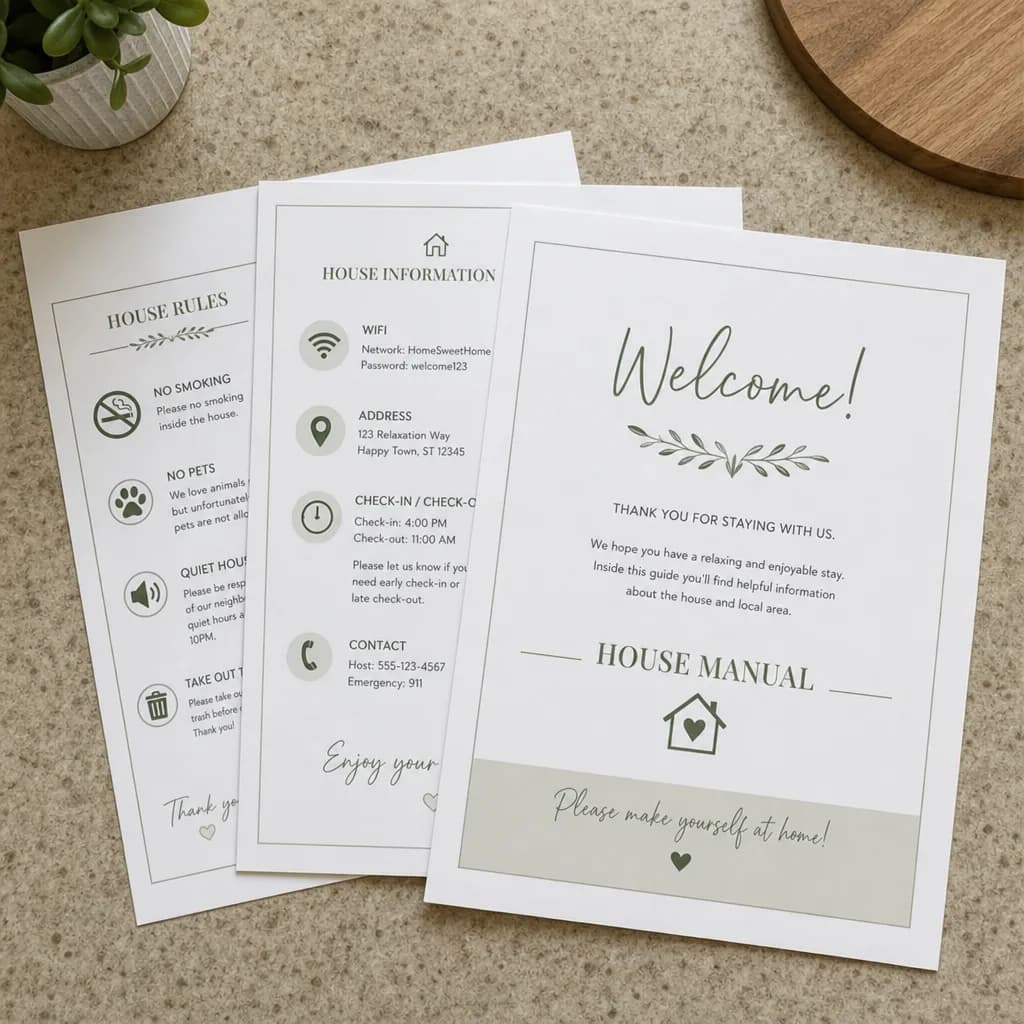
Copy the house manual template
Copy these original blocks into your document editor or open the complete plain-text file. Replace every bracketed field with verified property information; delete irrelevant amenities and instructions.
Open the complete editable guidebook template (.txt). It includes separate house-manual and local-guide sections plus a host-only publishing checklist. You can save it from your browser and edit it in a plain-text or document editor.
Welcome and quick essentials
Welcome to [property name]. This manual explains how to use the home. For questions or a problem, message us in your Airbnb reservation.
Wi-Fi: [guest network and password, in confirmed-guest materials only].
Checkout: [time and listing time zone].
Where to find arrival instructions: [location in the reservation].
Where to find local recommendations: [public guidebook link].
Parking and getting settled
Park in [verified space or parking area]. [Permit/display instructions, if needed.] Do not use [restricted space]. For extra vehicles, [verified alternative or ask us before arrival].
Inside the home, find [towels/blankets] in [location]. [State any steps, stairs or access constraints accurately.]
Appliances and household information
Heating/cooling: [control location and tested short instructions].
Kitchen: [appliance], [how to start it], [where supplies are].
Laundry: [availability and instructions, or clearly state it is not included].
TV: [remote/input instructions]. Use your own streaming account where required and sign out before leaving.
Trash/recycling: [bin location, sorting and applicable pickup information].
If a device is not working, [safe, manufacturer-appropriate first check] or message us. Do not repair or open equipment.
House rules, help and departure
Please follow the house rules shown in the listing: [brief accurate summary]. Quiet hours: [time range and local time zone]. Pets/smoking/visitors: [actual listing policies]. Do not add new restrictions, charges or exceptions here that conflict with the booking information.
For immediate danger, contact local emergency services first. Local emergency number: [verify for the property’s country]. Fire extinguisher/first-aid information: [verified location]. For a non-emergency issue, message us in Airbnb; if the app is unavailable, use [approved backup contact in private guest materials].
Checkout is [time]. Please [short essential departure steps consistent with the saved checkout instructions]. Key return/locking: [instructions]. If you need a different time, ask us; it is not approved until confirmed.
Bracketed fields are editorial placeholders, not Airbnb shortcodes. Check the finished text against the property and reservation before sharing it. Keep unique door, alarm or gate codes in the approved access workflow rather than a reusable public template. For a more detailed departure workflow, use the checkout instructions guide.
Copy the local guide template
Recommend a few places you can explain, rather than a long unverified list. Keep property access information out of this public version.
[Neighborhood or area]: a short local guide
Coffee/breakfast: [place] — [why it is useful], [verified distance or travel method].
Groceries: [store] — [practical location/access note].
Dinner: [place] — [cuisine, budget or suitability, only if checked].
A nearby activity: [place/activity] — [who it suits; booking or seasonal note if verified].
A rainy-day option: [place] — [useful detail].
Getting around: [verified transit/parking/walking advice].
Before you go: Check current opening hours, availability and any booking requirements. Last reviewed: [date].
If you cannot verify a place’s hours or accessibility, do not turn an assumption into a recommendation. Say what you know and link to its current official information. Local tips are suggestions, not a promise of third-party availability, safety or service quality.
Airbnb’s native Guidebook supports places, neighborhoods and city advice. This template is our original writing aid; it is not a copy of another host’s guide or an Airbnb-issued document.
A filled-in example without invented promises
This is a fictional writing example, not a customer property. It demonstrates the level of detail—not facts you should copy into your own listing.
Welcome to the example studio
Your arrival instructions are in your confirmed reservation. Park only in the space marked for your unit; if you bring a second vehicle, ask us for the current options before arrival.
The guest Wi-Fi details are in the private house manual. The spare blanket is on the upper shelf of the wardrobe. The TV remote is next to the screen; select HDMI 1, and use your own streaming login.
Please follow the quiet hours shown in the listing. Checkout remains the time in your reservation unless we confirm a change. Return the key to the agreed location and lock the door.
If something is unclear or not working, reply in the Airbnb conversation so we can check it.
| Weak wording | Better instruction | What must be checked |
|---|---|---|
| Parking is easy | Use [specific space]; [restriction] applies | The space exists and is available for the stay |
| Just use the heating | The control is [location]; press [tested action] | Instructions match the installed appliance |
| You can check out late | Ask us; the existing time applies until confirmed | Host decision and local preparation window |
| Lots of great restaurants nearby | [Place] is useful for [reason]; check its current hours | Location, hours and suitability |
- Weak wording
- Parking is easy
- Better instruction
- Use [specific space]; [restriction] applies
- What must be checked
- The space exists and is available for the stay
- Weak wording
- Just use the heating
- Better instruction
- The control is [location]; press [tested action]
- What must be checked
- Instructions match the installed appliance
- Weak wording
- You can check out late
- Better instruction
- Ask us; the existing time applies until confirmed
- What must be checked
- Host decision and local preparation window
- Weak wording
- Lots of great restaurants nearby
- Better instruction
- [Place] is useful for [reason]; check its current hours
- What must be checked
- Location, hours and suitability
The improvements are about specificity, not length. Never substitute an example address, place name or generic device-reset timing for verified information about your property.
Keep public links separate from private information
| Information | Recommended place | Check before sharing |
|---|---|---|
| General local recommendations | Public Guidebook | No private contact or access detail is included |
| Wi-Fi, appliance instructions and ordinary house details | Confirmed-guest house manual | Current instructions and appropriate permissions |
| Detailed arrival instructions | Airbnb arrival settings and the approved guest workflow | The correct stay and current check-in method |
| Unique door/alarm/gate codes | Authorized access communication for the intended stay | Never publish in a general guide, open document or public QR target |
| Owner contacts, vendor notes and maintenance records | Host-only file | Not copied into guest-facing materials |
- Information
- General local recommendations
- Recommended place
- Public Guidebook
- Check before sharing
- No private contact or access detail is included
- Information
- Wi-Fi, appliance instructions and ordinary house details
- Recommended place
- Confirmed-guest house manual
- Check before sharing
- Current instructions and appropriate permissions
- Information
- Detailed arrival instructions
- Recommended place
- Airbnb arrival settings and the approved guest workflow
- Check before sharing
- The correct stay and current check-in method
- Information
- Unique door/alarm/gate codes
- Recommended place
- Authorized access communication for the intended stay
- Check before sharing
- Never publish in a general guide, open document or public QR target
- Information
- Owner contacts, vendor notes and maintenance records
- Recommended place
- Host-only file
- Check before sharing
- Not copied into guest-facing materials
A QR code is a shortcut to a URL, not access control. Test the destination while signed out. If the link opens the whole manual publicly, anyone with the link may see it. Use separate public and restricted versions instead of relying on the code being hard to find.
Airbnb documents different access rules for its native sections. The public/private checklist above is editorial privacy guidance for your own materials, not a claim that every digital-guide provider implements the same permissions.
Put each part in the right Airbnb place
Desktop paths checked against Airbnb Help on October 12, 2026. Labels can change; use the linked Help instructions if your interface differs.
-
Local tips: Open Listings → select the listing → Listing editor → Arrival guide → Guidebooks. Set the title/cover and add places, neighborhoods and city advice. Review the public preview before sharing. Official guidebook steps.
-
House instructions: Open Listings → select the listing → Listing editor → Arrival guide → House manual, edit and save. Airbnb says confirmed guests can access this section. Official house-manual steps.
-
Arrival and departure: Save check-in method/instructions and checkout instructions in their own Arrival guide fields. Do not rely on a PDF to replace those settings. Official arrival and checkout steps.
Airbnb’s Help page notes that new Guidebooks are associated with the individual hosting account and that home co-hosts do not have access to new guidebooks. Check account permissions before asking a teammate to edit one. An external document has its own permission model; do not assume it inherits Airbnb’s.
A printed copy can help inside the home, but keep it consistent with the digital master. For multi-platform content or a dedicated digital guide, compare editing, permissions, mobile access and maintenance effort before choosing a tool. Native Airbnb, a plain document or a specialist guidebook can each be the right answer.
Test the guide before sharing it
This is a host usability check, not homework for paying guests. Ask a teammate unfamiliar with the property to use the guide on a phone.
- Can they quickly find Wi-Fi, parking, checkout and the right way to ask for help?
- Can they explain which information is public and which needs a confirmed reservation?
- Do the links open for the intended reader, without exposing restricted material?
- Do the appliance instructions match what is physically installed?
- Does the printed copy match the digital master?
- Can they distinguish an unanswered question from a request that needs someone to act?
| Change | Update the guide | Verify the other places |
|---|---|---|
| Appliance replaced | Rewrite and test its instructions | Photos, printed copy and saved replies |
| Access method changes | Update the authorized arrival workflow | Correct reservation instructions and obsolete copies |
| House rule or checkout instruction changes | Match the actual listing/booking policy | Native fields and message templates |
| Place closes or changes hours | Remove or revise the recommendation | Public Guidebook and printed/local-guide copies |
| Repeated guest confusion | Rewrite the unclear passage | Ask a fresh reader to find the answer |
- Change
- Appliance replaced
- Update the guide
- Rewrite and test its instructions
- Verify the other places
- Photos, printed copy and saved replies
- Change
- Access method changes
- Update the guide
- Update the authorized arrival workflow
- Verify the other places
- Correct reservation instructions and obsolete copies
- Change
- House rule or checkout instruction changes
- Update the guide
- Match the actual listing/booking policy
- Verify the other places
- Native fields and message templates
- Change
- Place closes or changes hours
- Update the guide
- Remove or revise the recommendation
- Verify the other places
- Public Guidebook and printed/local-guide copies
- Change
- Repeated guest confusion
- Update the guide
- Rewrite the unclear passage
- Verify the other places
- Ask a fresh reader to find the answer
Keep a private change log with the section, change date and person who checked it. Review after a meaningful property change or repeated question; a daily date change does not make stale information accurate. Property readiness and safety inspection are separate local jobs—this checklist maintains the guide, not the building.
When the guide is not enough
A guide answers stable questions. It cannot decide whether early check-in is possible, fix a broken lock or confirm that a cleaner delivered an extra towel. Those requests need a responsible person, a verified decision and a next update. Use the guest communication workflow when the problem goes beyond missing information.
That is where messaging assistance can complement—not replace—the guide. Morphic can use approved property guidance and stay context for replies in Copilot or Autopilot, and coordinate turnover follow-up. It is not required to use these templates and does not perform local work. Airbnb or a specialist guidebook still provides the guest-facing reference. Keep an existing PMS if you use one. See the guest messaging workflow and offer.
For a small property with a clear manual and occasional questions, native Airbnb tools and a human reply may be enough. Add software only when recurring questions or follow-through create a real workload. No template, image or tool score guarantees better bookings, reviews, search rankings or AI citations.
Appendix
Sources, definitions, and detailed notes behind this guide.
Summary, setup notes, and next stepsSource notes and practical details.
Key takeaways
Editable guidebook and house-manual resource
This article owns the template and example job, not the software category. The communication guide owns message timing and follow-through; the software page owns product selection.
Open Need help beyond a guide? Compare guest messaging softwareWhere to go next
References behind this guideAirbnb and market references behind the claims in this guide.
Read next
Related guides on Airbnb automation, guest replies, tool comparison, and host control.
Guest communication
Airbnb Guest Communication Guide for Hosts
Plan Airbnb guest communication from inquiry to checkout: message timing, duplicate-send checks, unresolved requests, and when to use templates, AI or human help.
Guest communication
Airbnb Pre-Check-In Messages: A Three-Message Cadence for Arrival Day
Plan Airbnb pre-check-in messages by stage: confirmation, arrival logistics, and verified access guidance. Combine same-day notices and follow your confirmed access process.
Guest communication
Airbnb Checkout Instructions: A Simple Checklist and a Reliable Handoff
Set up Airbnb checkout instructions, adapt three message templates, avoid duplicate reminders, and handle late checkout and cleaner handoffs.
Automated messages
How to Set Up Airbnb Automated Messages: A Hands-On Host Guide
Set up Airbnb scheduled quick replies, choose the listing, trigger and send time, and troubleshoot messages skipped for last-minute bookings or short stays.