
How to Optimize an Airbnb Listing: A Practical Host Checklist
A practical Airbnb listing optimization checklist: improve facts, photos, rules, arrival guidance, and repeat-question gaps without promising a ranking outcome.
Written and reviewed by Liam, Founder, Morphic
Guide fit
Hands-on Airbnb hosts who want a practical way to find and fix listing gaps before guests ask the same question again
Direct answer
Optimize the facts guests use to decide, then use their questions to find what is still unclear.
A useful Airbnb listing optimization process checks the listing facts, photos, amenities, rules, arrival guidance, availability and stay settings, then looks for repeat questions and review themes that expose missing proof. Improve one verified gap at a time. No checklist can guarantee a particular Airbnb ranking or booking result.
Check
Start with controllable facts
Review the title, description, photos and captions, amenities, house rules, arrival details, availability, stay settings, and pricing fit before changing copy.
Explain
Make the guest decision easier
Clarify the details guests compare before booking: parking, stairs, workspace, family setup, access, noise, heating, and local fit.
Learn
Use questions as the next audit
When the same uncertainty reappears, fix the listing, AI Guide, arrival note, or operating rule instead of only answering another message.
Do not start with a ranking promise
Airbnb listing optimization is not a trick for forcing a particular position. It is the work of making the listing accurate, easy to compare, and easier to trust for the guests it is meant to serve.
Start by defining the question a guest needs answered before booking. A parent may need to know about stairs. A remote worker may need to see the workspace. A driver may need precise parking information. A late arrival may need a clear, verified check-in path.
If a detail cannot be verified, do not turn it into stronger marketing language. Use a host, photographer, cleaner, pricing specialist, or local operator when their evidence is required.
Audit the listing as a guest decision path
Check the title and first description for who the stay suits. Then check the photos and captions, amenities, rules, availability and stay settings, and arrival guidance for the facts that support that promise.
The most useful audit question is not “what keyword can I add?” It is “what would a qualified guest still be uncertain about after reading this?” Write down the unanswered question, where the supporting fact should appear, and who can verify it.
A workspace, parking space, accessibility feature, pool, pet rule, or early-arrival policy should be described only as precisely as the home and host process can support.
Turn repeat questions into a living audit
Messages and reviews can reveal what the listing did not settle. Repeated parking, arrival, heating, Wi-Fi, family-fit, or workspace questions are not automatically defects, but they are a useful signal to inspect.
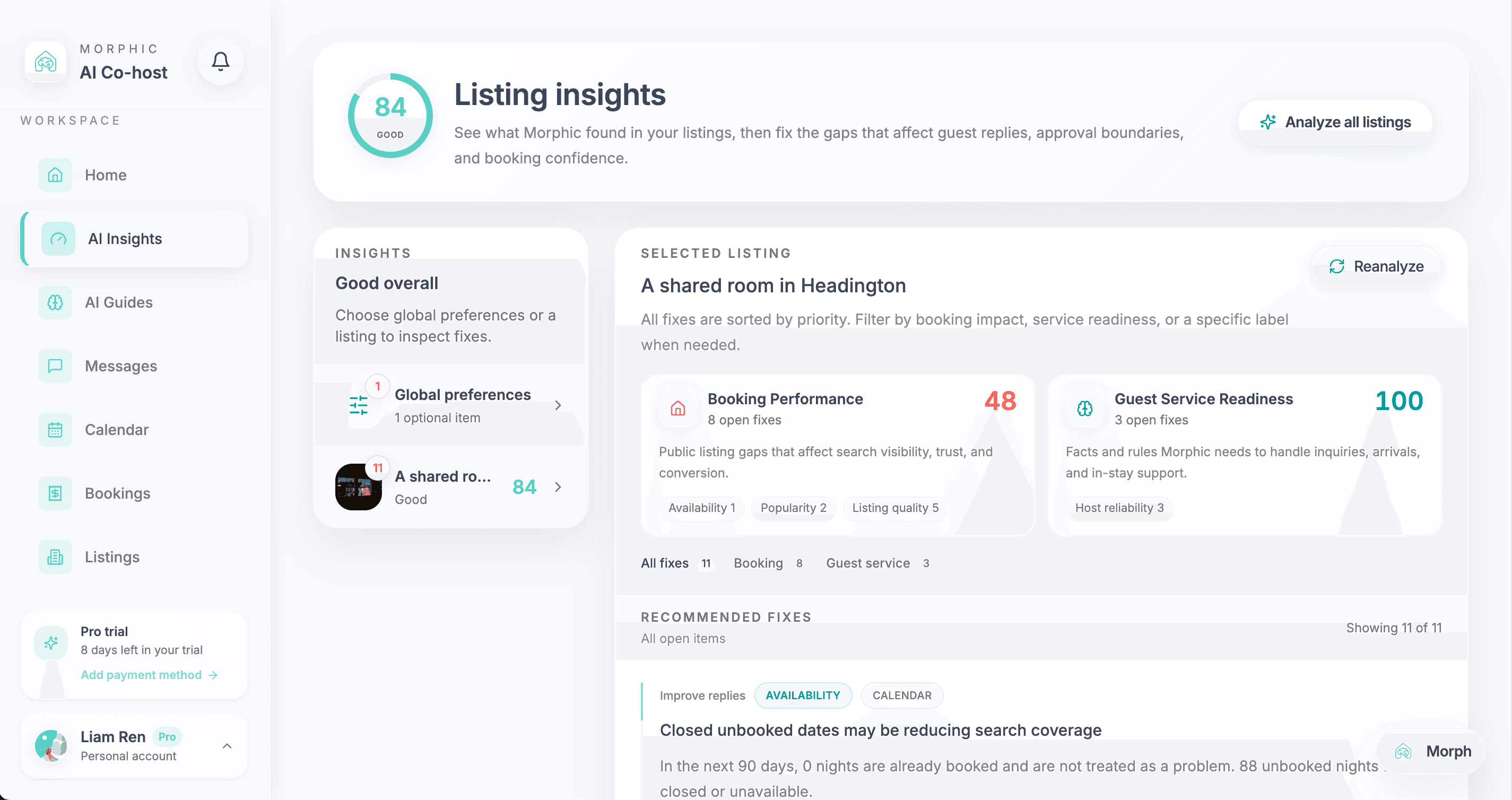
Morphic Listing Insights groups those signals into booking readiness and guest-service readiness, so the host can decide whether the next fix belongs in public copy, a photo caption, an AI Guide, an arrival note, or a host-review rule.
Choose the right place for the fix
Put a stable, guest-facing fact in the listing, amenity details, caption, rule, or arrival guidance where a guest can find it before asking. Put a host preference, tone rule, local recommendation, or escalation boundary in an AI Guide when it is intended to help future replies.
Keep live property status separate. Cleaning readiness, access changes, damage, refunds, safety issues, and exceptions require a current confirmation or host review; they should not become a confident evergreen listing claim or automatic reply.
If the missing proof is a better photograph, independent price strategy, field inspection, or multi-channel operating system, use the specialist that owns that job. Listing Insights can surface the gap without pretending to replace that work.
Measure clarity before claiming growth
For each change, record the date, the guest question it addresses, the listing surface changed, and the evidence confirming the fact. First check whether a guest can find and understand the answer without asking you.
Review the next batch of inquiries and completed stays: count repeated questions alongside the number of inquiries or stays, rather than comparing raw totals alone. Where your Airbnb account provides listing views or booking data, compare like-for-like periods and note changes in price, availability, season and guest mix. A few bookings cannot establish that a copy edit caused growth.
Keep public listing clarity, private arrival guidance and live property status separate. Repeat the checklist when a question recurs or the property changes. The goal is clearer guest decisions and fewer avoidable questions—not a guaranteed search ranking.
Frequently asked questions
How can I optimize an Airbnb listing without promising a better ranking?
Improve facts guests can verify: title and description, photos and captions, amenities, rules, arrival guidance, availability and stay settings, pricing fit, response quality, and recurring guest questions. Make one documented change at a time and treat the next guest signal as feedback, not proof of a ranking outcome.
What is the difference between Listing Insights and a managed listing optimization service?
Listing Insights is a host-controlled software workflow that surfaces booking- and service-readiness gaps from listing and guest signals. It can recommend supported digital improvements, but it does not provide a human copywriting service, professional photography, field inspection, pricing consultancy, or a guaranteed Airbnb ranking result.
Can AI change an Airbnb listing automatically?
Morphic can help identify and propose supported changes, but the host should approve public listing claims and sensitive guidance. Missing facts, access, cleaning readiness, safety, refunds, complaints, and policy exceptions need an appropriate human confirmation rather than an automatic promise.
Appendix
Sources, definitions, and detailed notes behind this guide.
Summary, setup notes, and next stepsSource notes and practical details.
Key takeaways
Airbnb listing optimization workflow guide
This guide owns the practical host checklist for finding and fixing one listing gap at a time. The Listing Insights page remains the commercial owner for software that turns connected guest and operating signals into an ongoing improvement workflow.
Open See Listing Insights for Airbnb hostsSix-step listing audit
Improve an Airbnb listing without chasing ranking hacks
Use this workflow for one listing at a time. It helps reveal what needs clearer proof; it does not replace photography, dynamic pricing, local operations, or Airbnb’s own ranking systems.
- Step 1Name the guest decisionChoose one situation that affects booking confidence or service readiness, such as parking, work setup, stairs, arrival, family fit, rules, or a recurring review concern.
- Step 2Verify the underlying factConfirm the exact property detail before changing public copy. Do not strengthen a claim because it sounds persuasive if the host cannot verify it.
- Step 3Check where the fact appearsLook across the title, description, photo story, captions, amenities, rules, arrival guidance, and saved guest guidance. A detail may exist but still be hard to find.
- Step 4Choose the smallest useful fixUpdate the clearest surface: a caption, amenity, rule, arrival note, AI Guide, or reply boundary. Keep a photo or specialist task separate when software cannot prove the fact.
- Step 5Keep public and risky changes reviewedThe host should approve public promises and any guidance involving access, cleaning, safety, complaints, refunds, or policy exceptions.
- Step 6Read the next guest signalWatch for clearer messages, fewer repeated questions, and better-informed conversations. If uncertainty persists, investigate the next surface rather than claiming the first change solved ranking.
Where to go next
References behind this guideAirbnb and market references behind the claims in this guide.
Read next
Related guides on Airbnb automation, guest replies, tool comparison, and host control.
Guest communication
Airbnb Pre-Booking Message Examples: Host Prompts, Guest Introductions, and Replies
Copy Airbnb pre-booking message examples for a host’s reservation prompt, a guest introduction, or a host reply. Choose the right message before sending.
Guest communication
Airbnb Guest Communication Guide for Hosts
Plan Airbnb guest communication from inquiry to checkout: message timing, duplicate-send checks, unresolved requests, and when to use templates, AI or human help.
Guest messaging
Do Airbnb Guest Messages Affect Ranking, Bookings, and Reviews?
A sourced guide to how Airbnb guest message speed and reply quality connect to search visibility, booking confidence, conversion, reviews, and safer AI automation.